Jim the Geordie <
jim@geordieland.co.uk> wrote:
Thanks. I seem to have solved the problem although my Windows 10
registry settings are different.
FWIW in the meanwhile I have discovered Em Client and since I only have
two email addresses, it is free. It does not have the Ad that outlook
has and the look is tidier.
Decisions, decisions :-)
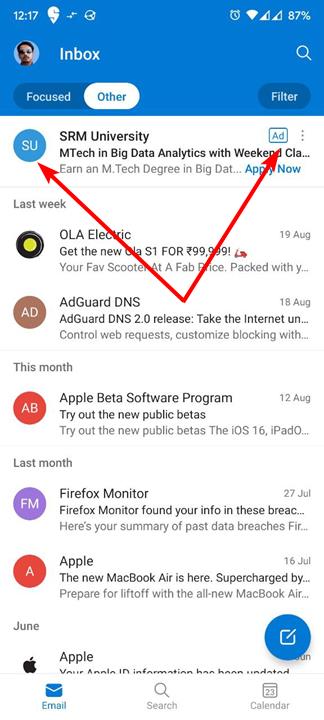
The ads you see in [new] Outlook are sponsored ads that Microsoft
deliberately presents in the Inbox. Those are not e-mails at all. They
are not delivered via SMTP, Exchange, or other e-mail transport from the sponsor to your Inbox. Microsoft is paid to show those sponsored ads,
and injects them at their mail server to *pretend* they are e-mails. In
fact, they are in-app ads, not e-mails. Next to those injected ads you
will see an "Ad" icon notifying you those are ads, not e-mails. Below
is an example screenshot of a Microsoft-injected sponsored ad presented
as a fake e-mail:
https://www.ghacks.net/wp-content/uploads/2022/08/Microsoft-is-displaying-more-ads-in-its-Outlook-app.jpg
Since new Outlook, the UWP (Universal Windows Platform) app is a web app
(an interface to their webmail service, not a full-service standalone client-side only e-mail client), the only way to hide those sponsored ad-injected fake e-mails from Microsoft is to use Focus view. The ads
then show up in the Other tab. Same when you use their webmail service:
Focus view shows the sponsored fake e-mail ads under the Other tab.
Since new Outlook is a web app, it reflects the same options available
in their webmail service. Notice in the above pic that user is using
Focused view mode on his Inbox, so the ads show up under the Other tab. However, other desirable e-mails may also show up only under the Other
tab, so you have to keep monitoring the Other tab to see if Microsoft
moved what is important to you but what Microsoft thought was not
important. If you don't use Focused Inbox view, you see the ads in what
you thought was just an Inbox for e-mails, as in:
https://tinyurl.com/mssponsoredads
Focused Inbox is described at:
https://support.microsoft.com/en-us/outlook/mail/focused-inbox-for-outlook
The problem with Focused Inbox is Microsoft has not clearly published
how they differentiate important e-mails shown in Focused Inbox from
those shown under Other. The sponsored ads go under Other, but what
else? That the article says "The more you use it, the better it gets",
but no mention just what actions you take to reflect importance.
While the standalone Outlook 2*** client-side e-mail *program* (not the
new Outlook UWP web app) also has Focus view, I don't have it enabled.
I don't recall seeing the sponsored fake e-mail ads injected into my
Inbox when using that client. The fake e-mails only appear in a Hotmail account when using their webmail service (using a web browser), or when
using their new Outlook web app. Having Microsoft shoves ads as fake
e-mails into the Inbox, and being unclear just how Focused Inbox view
works, was one of many reasons I dumped their new Outlook web app.
You cannot define server-side filters in your MS account nor define
client-side filters in the new Outlook web app that will move or delete
the injected sponsored ads. No ad blocker can remove these e-mails,
because they were never delivered using e-mail transports. Those ads
were never actually delivered into your Inbox. They are just presented
in the Inbox rather than use some banner or sidebar to show them. Users
are misled they are e-mails. With ad-supported (aka adware) programs
that show ads in banners or sidebars, it is obvious the program is a
platform for delivering ads. The ads are usually retrieved separate
from the e-mail functions, like from external connections to ad servers
or CDNs (Content Delivery Networks) which means they can be blocked by
using DNS services that incorporate ad-blocking capability, or by
proxies, or a local web filtering agent (e.g., Adguard's local filtering proxy). Microsoft was smart enough to realize the only way to ensure
the ads survived to display inside their new Outlook UWP client or in
their Outlook/Hotmail webmail service via web browser was to deliver
them from their mail service. Blocking that source would mean you
couldn't get your e-mails from them.
You need to decide how much you can tolerate of Microsoft injecting ads
into new Outlook or when using their webmail service, and pretending
they are e-mails (well, there is an "Ad" icon alongside each fake e-mail
to let you know they really were not e-mails). Bad enough having to
deal with spam that gets through server-side anti-spam filters,
server-side user-defined filters, client-side filters (I don't recall
new Outlook had any), cleaning out missed spam in the Inbox to only get assaulted by Microsoft with ads they inject that cannot be filtered out.
When I trialed new Outlook, or when using their webmail service via web browser, I had to use Focused Inbox to hide the ads, but other e-mails
would also show up under the Other tab. Having to toggle between
Focused and Other to check the Other tab meant I saw the ads just to see
what, if any, good e-mails Microsoft had put under Other. Much easier
to eliminate the fake e-mail ads by using a different e-mail client
(e.g., Thunderbird, Betterbird, eM Client) to which Microsoft cannot
deliver to present the fake e-mails. I use Outlook 2021, do NOT use
Focused Inbox, and don't recall seeing Microsoft's sponsored ads in that
local client-side e-mail client. Outlook is geared toward their
business market, and I doubt Microsoft wants to rile their biggest
revenue source.
By the way, I used eM Client for about 3 years. At first, they used
Google's Mail API to access Google accounts to sync on e-mail, contacts,
and calendar. However, that required a they have a quota on API calls
to Google, and eM Client kept running into errors when all their
freeloaders, like me, exceeded their quota. You couldn't retrieve any
more e-mails until their daily usage dropped below their quota. The
initial quota with a Google project account looks big, at first, until
you realize every connect counts as a quota hit, and every mail poll
incurred multiple API hits, and multiply by the number of freeloaders of
eM Client. eM Client had to buy more quota. That lasted 3 days, got
exceeded again, and em Client freeloaders could no longer get e-mail
again. Although they had a payware version, to keep paying for more and
more API quota for freeloaders wasn't financially viable, so eM Client
dropped their Google Mail API support to get rid of the need for an API
quota, and moved to just the standard e-mail protocols which meant sync
on just e-mail. That means you'll be using POP, IMAP, and SMTP for
e-mail access, and maybe CalDAV and CardDAV for calendar and contacts
sync (I didn't bother with those after the change since they are 1-way
sync, not 2-way).
Regarding the API exceeded error in eM Client, see:
https://forum.emclient.com/t/exceeded-api-quota-error/49437
That was only an issue if you used Gmail with eM Client, and back when
eM Client was trying to use Google's Mail API to sync on everything, not
just e-mail.
I did run into problems when using eM Client with Hotmail/Outlook.
Don't remember the specifics other than eM Client would stop polling my
MS accounts until I killed and restarted eM Client. The point of using
a client-side e-mail client is to have it running all the time to notify
you when there are newly arrived e-mails, to show reminders for calendar appointments, or send scheduled outbound e-mails. It would get quiet,
too quiet, I'd get suspicious, and kill and restart eM Client to find,
oh look, there are new e-mails.
I didn't care for how eM Client would group e-mails into conversations:
https://forum.emclient.com/t/how-does-em-client-implement-threading-to-construct-a-conversation/100711
Threading multiple e-mails into a conversation by falling back to using
the Subject header should NEVER be used, even if all the other methods
are missing. Everyone that ever sent a "Hello" e-mail would all be
grouped together in one conversation. If the conversations were group
by the presence of the other headers then there is reliability in the construct. If those are all missing, leave them as separate messages.
Never group solely based on Subject.
Then there was waiting forever for eM Client to poll an account while
showing a hazard-tape progress bar.
https://forum.emclient.com/t/hazard-tape-progress-bar-why-does-it-show/96937 If you're slow, and sometimes really slow, at monitoring and viewing new e-mails, you might not mind the long wait to finally completely download
a message after clicking on it despite setting up eM Client to
supposedly fully retrieve full messages with the settings I noted. Does
not appear the issue ever got addressed. Unfortunately the dev team
focuses more on new features than fixing bugs. Their forums are active,
but their dev team doesn't visit there.
Unless you pay for eM Client to get tech support, all you get is their
forum for peer support, but a user community doesn't have the same level
of expertise. I even paid for eM Client to get support, submitted
several tickets, but they never resolved any reported issue. My account
has since expired, so I cannot refer to issues I brought up to them.
I got fed up with the bugs and limitations of eM Client. It is a very
good local e-mail client, but has problems. I went back to the
standalone Outlook 2021 program. new Outlook sucks. Might as well just
use a web browser to connect to the Outlook/Hotmail website.
--- PyGate Linux v1.5.19
* Origin: Dragon's Lair, PyGate NNTP<>Fido Gate (3:633/10)