• Re: If you're used to the Windows WhatsApp SAVE PDF to device...

    From Herbert Kleebauer@3:633/10 to All on Thu Oct 29 09:01:16 2026
    On 10/29/2026 4:26 AM, Maria Sophia wrote:

    The solution is below, but it's as simple as installing this one FOSS app.
    <https://f-droid.org/packages/name.lmj001.savetodevice>

    Now the desktop and the Android device WhatsApp will save PDF files easily.
    I would suggest to install this app instead:

    https://f-droid.org/en/packages/org.primftpd/

    It also adds the ability to save shareable files but it is
    also an ftpd server. You don't need to use WhatsApp to copy
    pdf files to the smartphone but you can just drag&drop
    them with the mouse in Windows explorer.

    You can also just open the pdf file (for example in
    Firefox) and then save the pdf file from the pdf reader.
    No need to install an extra app for this purpose (but
    the ftpd server is a must have anyhow).


    --- PyGate Linux v1.5.19
    * Origin: Dragon's Lair, PyGate NNTP<>Fido Gate (3:633/10)
  • From Alan@3:633/10 to All on Thu Oct 29 13:13:05 2026
    On 2026-10-28 20:26, Maria Sophia wrote:
    Woo hoo!

    Frank recently astutely noted on the Android newsgroup there is a save to device on the desktop WhatsApp but not a similar option in the Android WA.
    I agree, saving *should* be a feature of WhatsApp, but - contrary
    to the Windows version - the Android version of WhatsApp does not
    have a save (file) feature, only Share. And by default - at least
    my Samsung phone - Share does not have a a save choice either.
    So... you'll need a extra file manager to get that.

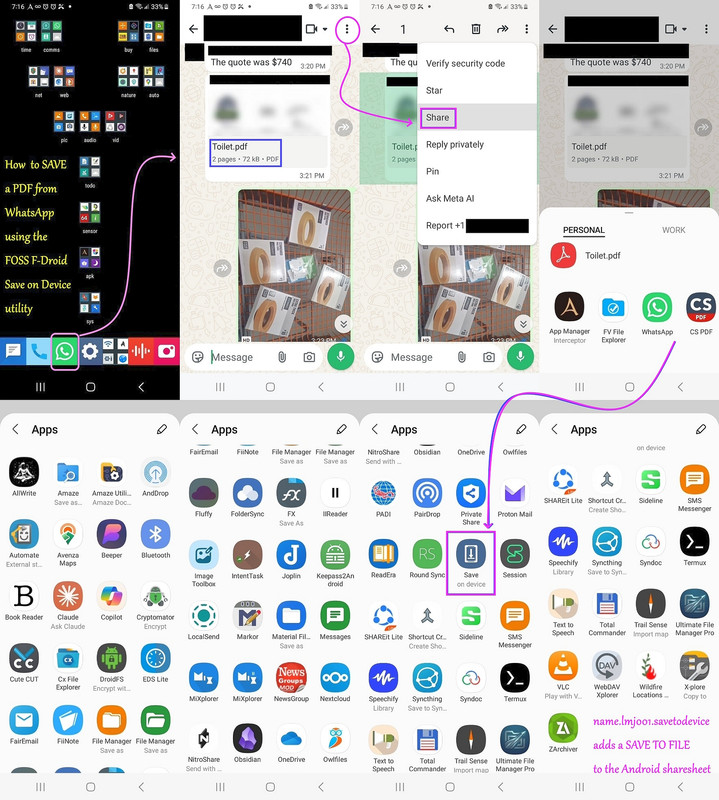
    Moments ago, I found a solution to that problem, which *adds* the Save on Device option to WhatsApp on Android so that they both work the same way.
    <https://i.postimg.cc/B6ryMZpn/saveasfile.jpg>

    The solution is below, but it's as simple as installing this one FOSS app.
    <https://f-droid.org/packages/name.lmj001.savetodevice>

    Now the desktop and the Android device WhatsApp will save PDF files easily.

    I don't use WhatsApp on my iPads so I ask the iPhone users if the WhatsApp
    on iOS can save directly to the device outside of WhatsApp storage?

    Probably not...

    As usual, Arlen/Andy/Maria/(too many nyms to count) is wrong:

    A PDF file sent to me via WhatsApp.

    I open it to view it.

    Then use the Share icon (the ubiquitous square with the upward facing arrow)...

    ...and choose "File".

    It was easy.

    --- PyGate Linux v1.5.19
    * Origin: Dragon's Lair, PyGate NNTP<>Fido Gate (3:633/10)
  • From Herbert Kleebauer@3:633/10 to All on Fri Oct 30 00:07:45 2026
    On 10/29/2026 9:00 PM, Maria Sophia wrote:
    Herbert Kleebauer wrote:

    I would suggest to install this app instead:

    https://f-droid.org/en/packages/org.primftpd/

    It also adds the ability to save shareable files but it is
    also an ftpd server. You don't need to use WhatsApp to copy
    pdf files to the smartphone but you can just drag&drop
    them with the mouse in Windows explorer.

    You can also just open the pdf file (for example in
    Firefox) and then save the pdf file from the pdf reader.
    No need to install an extra app for this purpose (but
    the ftpd server is a must have anyhow).

    FTP servers work but the problem is we have to get the file out of the app first, and if we can't do that, then there is no file that can be FTP'd.

    Now I'm confused. We started with the problem to transfer a pdf file
    from the PC to the smartphone. Once copied to the smartphone (for
    example by an ftp transfer) you can open the file with any pdf reader,
    for example Firefox.

    Then the idea was, if already installed, you can also use WhatsApp
    to transfer the pdf to the smartphone. But then you can only open
    the pdf file in a pdf reader but not directly store it on the disk,
    because WhatsApp doesn't provide a "save as". But this isn't a
    problem, because the pdf reader provides a "save as".


    Also, opening the file in Firefox (or, for that matter, in *anything*) presupposes you can share the file to that app which opens the PDF for viewing and, which saves the PDF (which is the 2nd desired constraint).

    But there is absolutely no problem using the combination WhatsApp/Firefox
    for pdf files.


    Interestingly, Frank astutely pointed out that the desktop WA has a Save To. But the mobile WA does NOT have a save to. Instead, mobiles have Share-To.

    If you want to transfer files of any type, Firefox is of no help. Then
    you need an app which doesn't interpret the content of the file, but
    just offers a "save as".


    Luckily, I found a universal solution that turns a share-to into a save-as.

    *PSA: I found a GREAT way to add 'save to device' to the Android share sheet (which works on apps like WA that don't want you to share to the device!)*
    <https://xdaforums.com/t/psa-i-found-a-great-way-to-add-save-to-device-to-the-android-share-sheet-which-works-on-apps-like-wa-that-dont-want-you-to-share-to-the-device.4806835/>
    My answer was: if you install an app for this purpose, better install https://f-droid.org/en/packages/org.primftpd/

    Primitive FTPd not only provides the "save as" function as your app,
    but also an FTPd server. This way you don't have to use WhatsApp for
    the file transfer but can do it by a simple drag&drop with the mouse
    in Windows explorer. Primitive FTPd is a replacement for your suggested
    app and you also can use it as FTPd server.


    --- PyGate Linux v1.5.19
    * Origin: Dragon's Lair, PyGate NNTP<>Fido Gate (3:633/10)
  • From Nick Charles@3:633/10 to All on Fri Oct 30 00:27:17 2026
    On Oct 29, 2026 at 4:13:05?PM EDT, "Alan" <nuh-uh@nope.com> wrote:

    On 2026-10-28 20:26, Maria Sophia wrote:

    I don't use WhatsApp on my iPads so I ask the iPhone users if the WhatsApp >> on iOS can save directly to the device outside of WhatsApp storage?

    Probably not...

    As usual, Arlen/Andy/Maria/(too many nyms to count) is wrong:

    A PDF file sent to me via WhatsApp.

    I open it to view it.

    Then use the Share icon (the ubiquitous square with the upward facing arrow)...

    ...and choose "File".

    It was easy.

    But! IT is a self-proclaimed EXPERT on iOS!!! Just ask IT and IT will tell you. Over and over.

    Nevermind that IT:

    Did not know that iOS has a built-in music playing app.

    Does not know how to use the Notes app.

    Does not know how to use the Files app.

    Did not know that the Files app can network to any computer.

    Thinks that Android is more secure than iOS.

    Thinks that every iOS update is the ENTIRE 10GB (or whatever size) iOS, even
    if just a single line of code was changed. Because he thinks that iOS is monolithic. Nevermind that you can see the exact size of EVERY iOS update. Which explains why x.0.0 versions take more time to DL/install than x.x.1 versions.

    Thinks that all apps will stop working if you are not logged into the "Apple Mainframes".

    Common Knowledge. Its not what you know. Its what you THINK you know.

    <https://www.youtube.com/watch?v=e0HGEZXTy8Y>

    --- PyGate Linux v1.5.19
    * Origin: Dragon's Lair, PyGate NNTP<>Fido Gate (3:633/10)
  • From Herbert Kleebauer@3:633/10 to All on Fri Oct 30 07:30:11 2026
    On 10/30/2026 4:49 AM, Maria Sophia wrote:
    Herbert Kleebauer wrote:

    What I love about this brilliantly elegant solution, is a tiny FOSS utility allows almost any app to "save as" from the "share to" menu.

    It's ingenious. It's brilliant. It's simple. It's robust. It just works!
    But if people don't like it, that's fine. It's just yet another method.

    Primitive FTPd not only provides the "save as" function as your app,
    but also an FTPd server. This way you don't have to use WhatsApp for
    the file transfer but can do it by a simple drag&drop with the mouse
    in Windows explorer. Primitive FTPd is a replacement for your suggested
    app and you also can use it as FTPd server.

    Now, I'm NOT saying FTP doesn't work. It does work. It works fine.
    But other solutions are FAR BETTER for many reasons, than FTP, IMHO.

    You misunderstood. I didn't suggest to install an FTP sever because
    then you don't need a "save as" app. I just said, there is at least
    one other "save as" app (and maybe many, many more) and that is https://f-droid.org/en/packages/org.primftpd/

    Now, if there are many apps for the same purpose, you have to
    make the decision, which one to install. And here primitiveFTPd
    has an big advantage, it not only provides the "save as" function
    but also is an ftpd server (which is it's main purpose). And a
    ftp server on a smartphone (I suppose an ftp server is also
    available for the iPhone) is very useful, because you can copy
    files from and to the phone by a simple drag&drop with the
    mouse in Windows explorer. Again, this doesn't mean an ftp
    server is the only or best way to copy files to the smartphone.
    But when you want to install a "save as" app, why not use one
    which offers this additional feature.


    --- PyGate Linux v1.5.19
    * Origin: Dragon's Lair, PyGate NNTP<>Fido Gate (3:633/10)