• audible temperature alarm?

    From J. P. Gilliver@3:633/10 to All on Fri Sep 18 19:58:12 2026
    Anyone know a utility that will sound an alarm if a specified sensor in
    the PC goes above a specified temperature? I remember some BIOSes used
    to (but I'm not aware of one for this Lenovo ideapad - only that it unceremoniously shuts itself off, for which I'd like some warning!). I
    do have SpeedFan, but that's output is only visual, and - even though it
    does have a tray option - it's easy to miss. (Or, if there was a way to
    make SpeedFan's tray option change colour above a settable threshold,
    but I'm not aware of such.)
    --
    J. P. Gilliver. UMRA: 1960/<1985 MB++G()ALIS-Ch++(p)Ar++T+H+Sh0!:`)DNAf

    "... four Oscars, and two further nominations ... On these criteria,
    he's Britain's most successful film director." Powell or Pressburger?
    no; Richard Attenborough? no; Nick Park!


    --- PyGate Linux v1.5.19
    * Origin: Dragon's Lair, PyGate NNTP<>Fido Gate (3:633/10)
  • From Hank Rogers@3:633/10 to All on Fri Sep 18 14:20:10 2026
    J. P. Gilliver wrote on 9/18/2026 1:58 PM:
    Anyone know a utility that will sound an alarm if a specified sensor in
    the PC goes above a specified temperature? I remember some BIOSes used
    to (but I'm not aware of one for this Lenovo ideapad - only that it unceremoniously shuts itself off, for which I'd like some warning!). I
    do have SpeedFan, but that's output is only visual, and - even though it
    does have a tray option - it's easy to miss. (Or, if there was a way to
    make SpeedFan's tray option change colour above a settable threshold,
    but I'm not aware of such.)


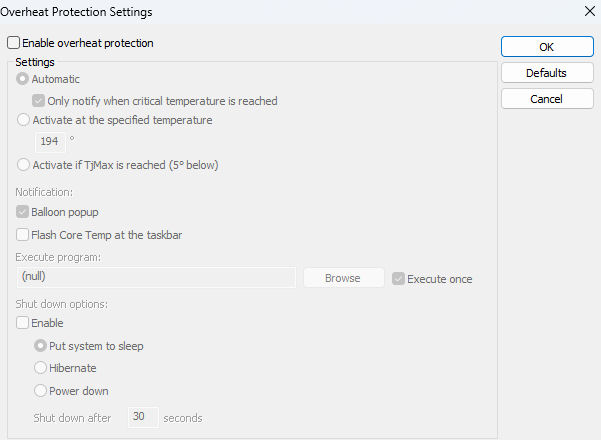
    Core temp has an option to execute a program when the temp goes above
    the set value. You could try having it run a program or batch that has
    an audio clip or other sound maker.

    I haven't tried it, but it looks like it might be what you need.

    https://www.alcpu.com/CoreTemp/

    There's a forum there that might help more.


    --- PyGate Linux v1.5.19
    * Origin: Dragon's Lair, PyGate NNTP<>Fido Gate (3:633/10)
  • From Frank Slootweg@3:633/10 to All on Fri Sep 18 19:29:44 2026
    J. P. Gilliver <G6JPG@255soft.uk> wrote:
    Anyone know a utility that will sound an alarm if a specified sensor in
    the PC goes above a specified temperature? I remember some BIOSes used
    to (but I'm not aware of one for this Lenovo ideapad - only that it unceremoniously shuts itself off, for which I'd like some warning!). I
    do have SpeedFan, but that's output is only visual, and - even though it
    does have a tray option - it's easy to miss. (Or, if there was a way to
    make SpeedFan's tray option change colour above a settable threshold,
    but I'm not aware of such.)

    SpeedFan can execute a command, any command i.e. also a .bat file, on
    certain temperature conditions, so you only need a command which plays
    the alarm you want. (I don't do sounds, so can't help with that part.)

    See this article for details:

    'SpeedFan's events'
    <https://almico.com/sfarticle.php?id=4>

    For example, I had [1] things like this in the Configure -> Events
    section:

    If Core (temp) from AMD K15 > 40
    For 1 times Allow every 3600 seconds
    Then execute C:\home\franks\local\bin\CPU_temp_high.bat 40

    Hope this helps.

    [1] 'had', past tense, because I no longer have.need SpeedFan.

    --- PyGate Linux v1.5.19
    * Origin: Dragon's Lair, PyGate NNTP<>Fido Gate (3:633/10)
  • From sticks@3:633/10 to All on Fri Sep 18 15:15:03 2026
    On 9/18/2026 2:20 PM, Hank Rogers wrote:
    J. P. Gilliver wrote on 9/18/2026 1:58 PM:
    Anyone know a utility that will sound an alarm if a specified sensor in
    the PC goes above a specified temperature? I remember some BIOSes used
    to (but I'm not aware of one for this Lenovo ideapad - only that it
    unceremoniously shuts itself off, for which I'd like some warning!). I
    do have SpeedFan, but that's output is only visual, and - even though it
    does have a tray option - it's easy to miss. (Or, if there was a way to
    make SpeedFan's tray option change colour above a settable threshold,
    but I'm not aware of such.)


    Core temp has an option to execute a program when the temp goes above
    the set value.ÿ You could try having it run a program or batch that has
    an audio clip or other sound maker.

    I haven't tried it, but it looks like it might be what you need.

    https://www.alcpu.com/CoreTemp/

    There's a forum there that might help more.

    I use CoreTemp on all my computer, but started because of the one I have
    in the garage where it get up to 90F and higher. Highly recommended.

    Here is the page showing the options for protection:

    <https://i.postimg.cc/NfdKLnj4/Core-Temp-Overheat-Protections.jpg>

    Here is what I leave in the taskbar, which is highest processor speed,
    highest CPU temp, and RAM used.

    <https://i.postimg.cc/vBGyrQPF/taskbar.jpg>

    --
    Science Doesn?t Support Darwin. Scientists Do


    --- PyGate Linux v1.5.19
    * Origin: Dragon's Lair, PyGate NNTP<>Fido Gate (3:633/10)
  • From J. P. Gilliver@3:633/10 to All on Fri Sep 18 21:28:28 2026
    On 2026/9/18 20:29:44, Frank Slootweg wrote:
    []
    SpeedFan can execute a command, any command i.e. also a .bat file, on certain temperature conditions, so you only need a command which plays
    the alarm you want. (I don't do sounds, so can't help with that part.)

    See this article for details:

    'SpeedFan's events'
    <https://almico.com/sfarticle.php?id=4>

    For example, I had [1] things like this in the Configure -> Events
    section:

    If Core (temp) from AMD K15 > 40
    For 1 times Allow every 3600 seconds
    Then execute C:\home\franks\local\bin\CPU_temp_high.bat 40

    Hope this helps.

    [1] 'had', past tense, because I no longer have.need SpeedFan.

    Thanks a lot! I was wondering if I could just put a sound file in the
    relevant place, since just "running" a sound file opens the associated
    player; however, in the drop-down after "then", one of the options is
    "beep", so I didn't even have to do that. Works a treat! Thanks again.

    (The recent very hot weather sometimes - like most British homes, I
    don't have A/C - caused my laptop to shut down. I have a big fan which
    keeps it [and me!] from overheating, but have to know when to turn it
    on; if the PC can tell me when it's getting uncomfortable, I can avoid
    that [the PC gives no warning].)
    --
    J. P. Gilliver. UMRA: 1960/<1985 MB++G()ALIS-Ch++(p)Ar++T+H+Sh0!:`)DNAf

    No sense being pessimistic. It wouldn't work anyway.
    - Penny Mayes, UMRA, 2014-August

    --- PyGate Linux v1.5.19
    * Origin: Dragon's Lair, PyGate NNTP<>Fido Gate (3:633/10)
  • From Paul@3:633/10 to All on Fri Sep 18 17:13:41 2026
    On Fri, 9/18/2026 4:28 PM, J. P. Gilliver wrote:
    On 2026/9/18 20:29:44, Frank Slootweg wrote:
    []
    SpeedFan can execute a command, any command i.e. also a .bat file, on
    certain temperature conditions, so you only need a command which plays
    the alarm you want. (I don't do sounds, so can't help with that part.)

    See this article for details:

    'SpeedFan's events'
    <https://almico.com/sfarticle.php?id=4>

    For example, I had [1] things like this in the Configure -> Events
    section:

    If Core (temp) from AMD K15 > 40
    For 1 times Allow every 3600 seconds
    Then execute C:\home\franks\local\bin\CPU_temp_high.bat 40

    Hope this helps.

    [1] 'had', past tense, because I no longer have.need SpeedFan.

    Thanks a lot! I was wondering if I could just put a sound file in the relevant place, since just "running" a sound file opens the associated player; however, in the drop-down after "then", one of the options is
    "beep", so I didn't even have to do that. Works a treat! Thanks again.

    (The recent very hot weather sometimes - like most British homes, I
    don't have A/C - caused my laptop to shut down. I have a big fan which
    keeps it [and me!] from overheating, but have to know when to turn it
    on; if the PC can tell me when it's getting uncomfortable, I can avoid
    that [the PC gives no warning].)

    Are you sure the cooling system is working properly on the machine ?

    Using Speedfan, you can watch the fan speed, versus the core temperature,
    as the core temperature goes up.

    You would have to be pretty familiar with "what is normal" for the thing,
    to decide it has a cooling problem. You should be able to feel a good
    flow of cooling air, when the fan is ramped up.

    Paul

    --- PyGate Linux v1.5.19
    * Origin: Dragon's Lair, PyGate NNTP<>Fido Gate (3:633/10)
  • From J. P. Gilliver@3:633/10 to All on Fri Sep 18 22:29:52 2026
    On 2026/9/18 22:13:41, Paul wrote:
    On Fri, 9/18/2026 4:28 PM, J. P. Gilliver wrote:
    []
    Thanks a lot! I was wondering if I could just put a sound file in the
    relevant place, since just "running" a sound file opens the associated

    player; however, in the drop-down after "then", one of the options is
    "beep", so I didn't even have to do that. Works a treat! Thanks again.


    (The recent very hot weather sometimes - like most British homes, I
    don't have A/C - caused my laptop to shut down. I have a big fan which

    keeps it [and me!] from overheating, but have to know when to turn it
    on; if the PC can tell me when it's getting uncomfortable, I can avoid

    that [the PC gives no warning].)

    Are you sure the cooling system is working properly on the machine ?

    I suspect not. Probably blocked vents - but it's fiddly to dismantle.


    Using Speedfan, you can watch the fan speed, versus the core temperatur
    e,
    as the core temperature goes up.

    Unfortunately, SpeedFan (4.5.2) doesn't seem to see the fan(s?) on this
    Lenovo ideapad laptop. (It only sees two temperatures - HD0 and GPU -
    but I think the GPU is in the main processor, so that's OK.)


    You would have to be pretty familiar with "what is normal" for the thin
    g,
    to decide it has a cooling problem. You should be able to feel a good
    flow of cooling air, when the fan is ramped up.

    Well, the odd times it has suddenly turned itself off seem to have
    correlated with the temperature reading being very high.


    Paul


    --
    J. P. Gilliver. UMRA: 1960/<1985 MB++G()ALIS-Ch++(p)Ar++T+H+Sh0!:`)DNAf

    There are two kinds of fool. One says, "This is old, and therefore
    good." And one says, "This is new, and therefore better."
    -John Brunner, science fiction writer (1934-1995)

    --- PyGate Linux v1.5.19
    * Origin: Dragon's Lair, PyGate NNTP<>Fido Gate (3:633/10)
  • From Paul@3:633/10 to All on Sat Sep 19 04:39:26 2026
    On Fri, 9/18/2026 5:29 PM, J. P. Gilliver wrote:


    Well, the odd times it has suddenly turned itself off seem to have
    correlated with the temperature reading being very high.

    It should have responded to the high temperatures by throttling.
    You might notice the machine being a little slow to do stuff.

    When the temperature rises another 10-20 degrees, that's when it
    shuts off. And to rise that additional 10-20 degrees,
    you pretty well need a cooling failure to help you get there.
    (Blocked vent, fan stopped turning, bad thermal paste,
    lack of normal force, leaking heatpipe - no fluid,
    partial short circuit in VCore...)

    The original screened-on thermal paste is usually
    a lifetime application. If the user has disassembled the
    heatpipe assembly and used AS3 or AS5 paste, you might have
    to re-do that every five to ten years, as conditions
    deteriorate. The original phase-change paste is rough and
    hard stuff (when cold), and if you don't change it out, it's
    difficult to get it to work a second time. And the phase-change
    paste is best, on a lidded CPU - not all laptop processors are
    lidded and some have a bare die to work with, so you can't
    be as rough with them.

    It likely just need a vent and fan cleaning, and
    no particular dramas. You'll have to work through the
    possibilities and decide what is going on there. Do a google
    on the model and see if there is a history of cooling
    problems.

    Paul


    --- PyGate Linux v1.5.19
    * Origin: Dragon's Lair, PyGate NNTP<>Fido Gate (3:633/10)
  • From Frank Slootweg@3:633/10 to All on Sat Sep 19 14:39:46 2026
    J. P. Gilliver <G6JPG@255soft.uk> wrote:
    On 2026/9/18 22:13:41, Paul wrote:
    [...]
    Are you sure the cooling system is working properly on the machine ?

    I suspect not. Probably blocked vents - but it's fiddly to dismantle.

    Yes, been there. I just cleaned the vents from the outside. Too risky
    (for me) to try to open/disassemble it.

    Using Speedfan, you can watch the fan speed, versus the core temperature, as the core temperature goes up.

    Unfortunately, SpeedFan (4.5.2) doesn't seem to see the fan(s?) on this Lenovo ideapad laptop. (It only sees two temperatures - HD0 and GPU -
    but I think the GPU is in the main processor, so that's OK.)

    If you want the 'see' (and control) the fan, you may want to (also,
    i.e. in addition to SpeedFan) have a look at 'NoteBook FanControl'
    (NBFC) [1].

    NBFC works with a configuration files for different types of Embedded Controllers (EC) for different laptops. Several configuration files are supplied. I used one for a similar (HP) laptop than mine.

    I used SpeedFan and NoteBook FanControl side-by-side, using each's
    unique features.

    Hope this helps.

    --- PyGate Linux v1.5.19
    * Origin: Dragon's Lair, PyGate NNTP<>Fido Gate (3:633/10)
  • From Frank Slootweg@3:633/10 to All on Sat Sep 19 14:57:25 2026
    A liitle earlier, I wrote:
    J. P. Gilliver <G6JPG@255soft.uk> wrote:
    On 2026/9/18 22:13:41, Paul wrote:
    [...]
    [...]

    [About 'NoteBook FanControl':]

    Oops, I forgot the URL:

    [1] 'NoteBook FanControl' <https://github.com/hirschmann/nbfc>

    --- PyGate Linux v1.5.19
    * Origin: Dragon's Lair, PyGate NNTP<>Fido Gate (3:633/10)
  • From Paul@3:633/10 to All on Sat Sep 19 11:59:02 2026
    On Sat, 9/19/2026 10:39 AM, Frank Slootweg wrote:
    J. P. Gilliver <G6JPG@255soft.uk> wrote:
    On 2026/9/18 22:13:41, Paul wrote:
    [...]
    Are you sure the cooling system is working properly on the machine ?

    I suspect not. Probably blocked vents - but it's fiddly to dismantle.

    Yes, been there. I just cleaned the vents from the outside. Too risky
    (for me) to try to open/disassemble it.

    Using Speedfan, you can watch the fan speed, versus the core temperature, >>> as the core temperature goes up.

    Unfortunately, SpeedFan (4.5.2) doesn't seem to see the fan(s?) on this
    Lenovo ideapad laptop. (It only sees two temperatures - HD0 and GPU -
    but I think the GPU is in the main processor, so that's OK.)

    If you want the 'see' (and control) the fan, you may want to (also,
    i.e. in addition to SpeedFan) have a look at 'NoteBook FanControl'
    (NBFC) [1].

    NBFC works with a configuration files for different types of Embedded Controllers (EC) for different laptops. Several configuration files are supplied. I used one for a similar (HP) laptop than mine.

    I used SpeedFan and NoteBook FanControl side-by-side, using each's
    unique features.

    Hope this helps.


    SpeedFan is out of support, and when new SuperIO show up, the Hardware
    Monitor may not be supported by the hobby community. That's why the
    three machines in the room at the moment, Speedfan does not work on
    two of them. If you have brand new equipment, there's a good
    chance you'll be in for some surprises. The OEM may offer a utility
    for the purpose, but the security of the driver may cause Windows Defender
    to ask to purge it. You can't win really. It's the year 2026 after all.

    I had hoped that some day, the common feature set of SuperIO hardware
    monitors, would become ACPI tables and could be passed with ACPI calls.
    And this would make the construction of such utilities, a lot easier
    for hobbyists. (Would no longer need a signed driver to install
    on Windows, to access the hardware monitor registers. The Speedfan
    dev, had some local company sign his driver, as it would have
    cost too much for a hobbyist to sign a driver properly.)

    Paul

    --- PyGate Linux v1.5.19
    * Origin: Dragon's Lair, PyGate NNTP<>Fido Gate (3:633/10)
  • From J. P. Gilliver@3:633/10 to All on Sat Sep 19 20:34:10 2026
    On 2026/9/19 9:39:26, Paul wrote:
    On Fri, 9/18/2026 5:29 PM, J. P. Gilliver wrote:


    Well, the odd times it has suddenly turned itself off seem to have
    correlated with the temperature reading being very high.

    It should have responded to the high temperatures by throttling.
    You might notice the machine being a little slow to do stuff.

    What I use it for, I'd probably not have noticed; all I can think of
    that I do that is in any way processor-intensive is the odd bit of video
    or audio processing, and that rarely enough (I can't remember the last
    time I did anyhing to video other than ausio extraction) that I'm not
    sure how fast it runs anyway. OK, maybe yt-dlp, but I generally run that
    while I'm doing something else (non-intensive) anyway.>
    When the temperature rises another 10-20 degrees, that's when it
    shuts off. And to rise that additional 10-20 degrees,
    you pretty well need a cooling failure to help you get there.
    (Blocked vent, fan stopped turning, bad thermal paste,
    lack of normal force, leaking heatpipe - no fluid,
    partial short circuit in VCore...)

    Could be any of those.


    The original screened-on thermal paste is usually
    a lifetime application. If the user has disassembled the
    heatpipe assembly and used AS3 or AS5 paste, you might have
    to re-do that every five to ten years, as conditions
    deteriorate. The original phase-change paste is rough and
    hard stuff (when cold), and if you don't change it out, it's
    difficult to get it to work a second time. And the phase-change
    paste is best, on a lidded CPU - not all laptop processors are
    lidded and some have a bare die to work with, so you can't
    be as rough with them.

    Almost certainly not going to dismantle it.


    It likely just need a vent and fan cleaning, and
    no particular dramas. You'll have to work through the
    possibilities and decide what is going on there. Do a google
    on the model and see if there is a history of cooling
    problems.

    I might do that,


    Paul


    --
    J. P. Gilliver. UMRA: 1960/<1985 MB++G()ALIS-Ch++(p)Ar++T+H+Sh0!:`)DNAf

    In pop everything comes back; often it comes back before it's even gone
    away. - David Hepworth, RT 2026/1/14-20

    --- PyGate Linux v1.5.19
    * Origin: Dragon's Lair, PyGate NNTP<>Fido Gate (3:633/10)
  • From J. P. Gilliver@3:633/10 to All on Sat Sep 19 20:37:22 2026
    On 2026/9/19 15:39:46, Frank Slootweg wrote:
    J. P. Gilliver <G6JPG@255soft.uk> wrote:
    On 2026/9/18 22:13:41, Paul wrote:
    [...]
    Are you sure the cooling system is working properly on the machine ?

    I suspect not. Probably blocked vents - but it's fiddly to dismantle.

    Yes, been there. I just cleaned the vents from the outside. Too risky
    (for me) to try to open/disassemble it.

    I think same here. Last time I _did_ try to replace the cooling on a
    laptop, I never got it working again.


    Using Speedfan, you can watch the fan speed, versus the core temperature, >>> as the core temperature goes up.

    Unfortunately, SpeedFan (4.5.2) doesn't seem to see the fan(s?) on this
    Lenovo ideapad laptop. (It only sees two temperatures - HD0 and GPU -
    but I think the GPU is in the main processor, so that's OK.)

    If you want the 'see' (and control) the fan, you may want to (also,
    i.e. in addition to SpeedFan) have a look at 'NoteBook FanControl'
    (NBFC) [1].

    Thanks (and for the later post with the URL). At present, I don't want
    to control it - I just use SpeedFan to _look at_ the temperature sensors
    - but it would be nice to _see_ it.>
    NBFC works with a configuration files for different types of Embedded Controllers (EC) for different laptops. Several configuration files are supplied. I used one for a similar (HP) laptop than mine.

    I used SpeedFan and NoteBook FanControl side-by-side, using each's
    unique features.

    Hope this helps.

    Thanks again.
    --
    J. P. Gilliver. UMRA: 1960/<1985 MB++G()ALIS-Ch++(p)Ar++T+H+Sh0!:`)DNAf

    In pop everything comes back; often it comes back before it's even gone
    away. - David Hepworth, RT 2026/1/14-20

    --- PyGate Linux v1.5.19
    * Origin: Dragon's Lair, PyGate NNTP<>Fido Gate (3:633/10)
  • From J. P. Gilliver@3:633/10 to All on Sat Sep 19 20:50:27 2026
    On 2026/9/19 16:59:2, Paul wrote:
    []
    SpeedFan is out of support, and when new SuperIO show up, the Hardware Monitor may not be supported by the hobby community. That's why the

    Not sure how old this laptop is, but far from new. Let's see, Speccy
    (yes, I know, but it does what I need) tells me it has a socket FP4
    (968), Radeon R5, BIOS date 2017/4/17; My SpeedFan says it (SpeedFan) is 2000-2016, so it might indeed not know the hardware.

    three machines in the room at the moment, Speedfan does not work on
    two of them. If you have brand new equipment, there's a good
    chance you'll be in for some surprises. The OEM may offer a utility
    for the purpose, but the security of the driver may cause Windows Defender
    to ask to purge it. You can't win really. It's the year 2026 after all.

    :-)


    I had hoped that some day, the common feature set of SuperIO hardware monitors, would become ACPI tables and could be passed with ACPI calls.
    And this would make the construction of such utilities, a lot easier
    for hobbyists. (Would no longer need a signed driver to install
    on Windows, to access the hardware monitor registers. The Speedfan
    dev, had some local company sign his driver, as it would have
    cost too much for a hobbyist to sign a driver properly.)

    Paul

    I'd hoped lots of things - printers and scanners in particular - would
    have had a standard interface by now, but no such luck.
    --
    J. P. Gilliver. UMRA: 1960/<1985 MB++G()ALIS-Ch++(p)Ar++T+H+Sh0!:`)DNAf

    In pop everything comes back; often it comes back before it's even gone
    away. - David Hepworth, RT 2026/1/14-20

    --- PyGate Linux v1.5.19
    * Origin: Dragon's Lair, PyGate NNTP<>Fido Gate (3:633/10)
  • From Paul@3:633/10 to All on Sat Sep 19 20:43:28 2026
    On Sat, 9/19/2026 3:50 PM, J. P. Gilliver wrote:
    On 2026/9/19 16:59:2, Paul wrote:
    []
    SpeedFan is out of support, and when new SuperIO show up, the Hardware
    Monitor may not be supported by the hobby community. That's why the

    Not sure how old this laptop is, but far from new. Let's see, Speccy
    (yes, I know, but it does what I need) tells me it has a socket FP4
    (968), Radeon R5, BIOS date 2017/4/17; My SpeedFan says it (SpeedFan) is 2000-2016, so it might indeed not know the hardware.

    There is a list of FP4 socket processors here, but I don't know
    how complete this is. These are mostly relatively low power.

    https://www.techpowerup.com/cpu-specs/?socket=AMD%20Socket%20FP4

    You could try the ZIP-English here, as that might be the portable one.
    If the screen gets covered up, do a Reload of the page. The first pane
    of CPUZ shows processor details. The last button, has an option to
    save a text file, if you want to pick bits out to make a text posting
    with them. The text file has a lot of details that only a few people
    are interested in (DIMM SPD contents and the like).

    https://www.cpuid.com/softwares/cpu-z.html

    Paul


    --- PyGate Linux v1.5.19
    * Origin: Dragon's Lair, PyGate NNTP<>Fido Gate (3:633/10)
  • From J. P. Gilliver@3:633/10 to All on Sun Sep 20 10:08:54 2026
    On 2026/9/20 1:43:28, Paul wrote:
    On Sat, 9/19/2026 3:50 PM, J. P. Gilliver wrote:
    On 2026/9/19 16:59:2, Paul wrote:
    []
    SpeedFan is out of support, and when new SuperIO show up, the Hardware
    Monitor may not be supported by the hobby community. That's why the

    Not sure how old this laptop is, but far from new. Let's see, Speccy
    (yes, I know, but it does what I need) tells me it has a socket FP4
    (968), Radeon R5, BIOS date 2017/4/17; My SpeedFan says it (SpeedFan) is
    2000-2016, so it might indeed not know the hardware.

    There is a list of FP4 socket processors here, but I don't know
    how complete this is. These are mostly relatively low power.

    https://www.techpowerup.com/cpu-specs/?socket=AMD%20Socket%20FP4

    You could try the ZIP-English here, as that might be the portable one.
    If the screen gets covered up, do a Reload of the page. The first pane
    of CPUZ shows processor details. The last button, has an option to
    save a text file, if you want to pick bits out to make a text posting
    with them. The text file has a lot of details that only a few people
    are interested in (DIMM SPD contents and the like).

    https://www.cpuid.com/softwares/cpu-z.html

    Paul

    Sorry - Speccy does tell me a lot about the CPU; I didn't mention it as
    I was really only looking for the age of the laptop, to see if it was
    later than SpeedFan to explain why the latter might not be able to see
    its fans. Here's what Speccy says about the CPU:

    AMD A10-9600P
    Cores 4
    Threads 4
    Name AMD A10-9600P
    Code Name Bristol Ridge
    Package Socket FP4 (968)
    Technology 28nm
    Specification AMD A10-9600P RADEON R5, 10 COMPUTE CORES 4C+6G
    Family F
    Extended Family 15
    Model 5
    Extended Model 65
    Stepping 1
    Revision BR-A1
    Instructions MMX (+), SSE, SSE2, SSE3, SSSE3, SSE4.1, SSE4.2, SSE4A, AMD 64, NX, VMX, AES, AVX, AVX2, FMA3, FMA4
    Virtualization Supported, Enabled
    Hyperthreading Not supported
    Bus Speed 99.8 MHz
    Stock Core Speed 2400 MHz
    Stock Bus Speed 100 MHz
    Caches
    L1 Data Cache Size 4 x 32 KBytes
    L1 Instructions Cache Size 2 x 96 KBytes
    L2 Unified Cache Size 2 x 1024 KBytes
    Cores
    Core Speed Multiplier Bus Speed Threads
    Core 0 2594.7 MHz x 26.0 99.8 MHz APIC ID: 0
    Core 1 2594.7 MHz x 26.0 99.8 MHz APIC ID: 1
    Core 2 2594.7 MHz x 26.0 99.8 MHz APIC ID: 2
    Core 3 2594.7 MHz x 26.0 99.8 MHz APIC ID: 3

    (While I'm watching it, the core speeds shown are varying - mostly just
    by a little, e. g. to 2395.1, occasionally to 1996.0, but only for a
    moment [I had to wait some tens of seconds to catch that]. And only one
    of the four changes - though as I typed that I saw two of them start
    with 1 for one sample.)
    --
    J. P. Gilliver. UMRA: 1960/<1985 MB++G()ALIS-Ch++(p)Ar++T+H+Sh0!:`)DNAf

    "Mary Poppins is a junkie"
    - bumper sticker on Julie Andrews' car in the '60s

    --- PyGate Linux v1.5.19
    * Origin: Dragon's Lair, PyGate NNTP<>Fido Gate (3:633/10)
  • From Paul@3:633/10 to All on Sun Sep 20 14:03:22 2026
    On Sun, 9/20/2026 5:08 AM, J. P. Gilliver wrote:
    On 2026/9/20 1:43:28, Paul wrote:
    On Sat, 9/19/2026 3:50 PM, J. P. Gilliver wrote:
    On 2026/9/19 16:59:2, Paul wrote:
    []
    SpeedFan is out of support, and when new SuperIO show up, the Hardware >>>> Monitor may not be supported by the hobby community. That's why the

    Not sure how old this laptop is, but far from new. Let's see, Speccy
    (yes, I know, but it does what I need) tells me it has a socket FP4
    (968), Radeon R5, BIOS date 2017/4/17; My SpeedFan says it (SpeedFan) is >>> 2000-2016, so it might indeed not know the hardware.

    There is a list of FP4 socket processors here, but I don't know
    how complete this is. These are mostly relatively low power.

    https://www.techpowerup.com/cpu-specs/?socket=AMD%20Socket%20FP4

    You could try the ZIP-English here, as that might be the portable one.
    If the screen gets covered up, do a Reload of the page. The first pane
    of CPUZ shows processor details. The last button, has an option to
    save a text file, if you want to pick bits out to make a text posting
    with them. The text file has a lot of details that only a few people
    are interested in (DIMM SPD contents and the like).

    https://www.cpuid.com/softwares/cpu-z.html

    Paul

    Sorry - Speccy does tell me a lot about the CPU; I didn't mention it as
    I was really only looking for the age of the laptop, to see if it was
    later than SpeedFan to explain why the latter might not be able to see
    its fans. Here's what Speccy says about the CPU:

    AMD A10-9600P
    Cores 4
    Threads 4
    Name AMD A10-9600P
    Code Name Bristol Ridge
    Package Socket FP4 (968)
    Technology 28nm
    Specification AMD A10-9600P RADEON R5, 10 COMPUTE CORES 4C+6G
    Family F
    Extended Family 15
    Model 5
    Extended Model 65
    Stepping 1
    Revision BR-A1
    Instructions MMX (+), SSE, SSE2, SSE3, SSSE3, SSE4.1, SSE4.2, SSE4A, AMD 64, NX, VMX, AES, AVX, AVX2, FMA3, FMA4
    Virtualization Supported, Enabled
    Hyperthreading Not supported
    Bus Speed 99.8 MHz
    Stock Core Speed 2400 MHz
    Stock Bus Speed 100 MHz
    Caches
    L1 Data Cache Size 4 x 32 KBytes
    L1 Instructions Cache Size 2 x 96 KBytes
    L2 Unified Cache Size 2 x 1024 KBytes
    Cores
    Core Speed Multiplier Bus Speed Threads
    Core 0 2594.7 MHz x 26.0 99.8 MHz APIC ID: 0
    Core 1 2594.7 MHz x 26.0 99.8 MHz APIC ID: 1
    Core 2 2594.7 MHz x 26.0 99.8 MHz APIC ID: 2
    Core 3 2594.7 MHz x 26.0 99.8 MHz APIC ID: 3

    (While I'm watching it, the core speeds shown are varying - mostly just
    by a little, e. g. to 2395.1, occasionally to 1996.0, but only for a
    moment [I had to wait some tens of seconds to catch that]. And only one
    of the four changes - though as I typed that I saw two of them start
    with 1 for one sample.)


    OK, this is the information we need.

    https://www.reddit.com/r/Amd/comments/5g270f/is_the_a109600p_26ghz_any_good/

    "Also, I have the problem where my laptop gets too hot and restarts,
    someone also mentioned this, so it might be minimal.(Blame the laptop fans
    and HP's build)
    "

    That suggests the THERMTRIP is set too low. An Intel one might be set
    at 110C or 120C or so, whereas the outboard (third party chip for safe shutdown)
    those can be set at 85C. An AMD of that era, should have internal THERMTRIP just
    like Intel, so it should not be artificially trimmed to 85C. My AthlonXP board had the outboard safety chip (added late in the design cycle, you had to check the revision on the motherboard before buying), and that chip it was hard to tell
    exactly what it was really designed for. It was a small chip and not designed for infinitely variable trip point. (They could have used a couple of precision resistors to set the trip point.) The safety chip was included, to protect against
    "my CPU cooler fell off" accidents :-) The processor would overheat instantly (2 seconds) and it could crack the die, the code running at the time would crash
    and so on. Those were bare die days, and you could chip little pieces out
    of the edge of the thing, without too much trouble. They used to include a shim to help protect the die, for some of those designs.

    A Geekbench lists it as

    A10-9600P
    2400Mhz Base
    3300Mhz (Turbo of sorts)
    4C 4T 15W TDP <=== allowed to go higher for 80-100 seconds
    Radeon R5 iGPU (which throttles when the CPU turbos)

    and the multicore rating is only 2x the single thread, so
    it's "pretty strangled" by circumstances beyond its control.

    https://www.notebookcheck.net/Bristol-Ridge-in-Review-AMDs-A10-9600P-Against-the-Competition.168477.0.html

    "While idling, the Pavilion 15-aw004ng runs at 5.7 to 9.3 watts"

    And that's the level of heating it has to be able to withstand
    in your hot weather. Yours is running at 26x multiplier while
    the claimed lower limit is 24x. Yet some of the NotepadCheck benchmark
    results find the CPU clock is lower than the 2400MHz number, it
    does appear the multiplier can go lower. Throttling is an additional
    effect possible in CPU design, where no-operation codes are injected
    into the instruction stream to reduce power consumption.

    Might need more fan... Or some hand-optimizing of the cooling path.
    After all, every customer is a thermal engineer, right ? We live
    for these opportunities to stamp out stupid stuff.

    I've told you before, of my buying electronics having a "decorative" fan.
    You could see the fan hole OK. But, they placed no intake holes on the other side of the housing for the thing. The result is the fan spins, but
    it can't cool anything. My electric drill fixed the two items designed
    that way. I must have put 20-30 holes in a front area, to provide
    an intake vent. That is your job as the customer, to have your
    electric drill handy, to finish the design. And I don't really enjoy
    drilling hard plastics, as some of them prefer to crack rather than
    be drilled.

    Paul

    --- PyGate Linux v1.5.19
    * Origin: Dragon's Lair, PyGate NNTP<>Fido Gate (3:633/10)
  • From J. P. Gilliver@3:633/10 to All on Sun Sep 20 20:22:24 2026
    On 2026/9/20 19:3:22, Paul wrote:
    On Sun, 9/20/2026 5:08 AM, J. P. Gilliver wrote:
    []
    Sorry - Speccy does tell me a lot about the CPU; I didn't mention it as
    I was really only looking for the age of the laptop, to see if it was
    later than SpeedFan to explain why the latter might not be able to see
    its fans. Here's what Speccy says about the CPU:

    AMD A10-9600P
    Cores 4
    Threads 4
    Name AMD A10-9600P
    Code Name Bristol Ridge
    []
    OK, this is the information we need.

    https://www.reddit.com/r/Amd/comments/5g270f/is_the_a109600p_26ghz_any_good/

    "Also, I have the problem where my laptop gets too hot and restarts,
    someone also mentioned this, so it might be minimal.(Blame the laptop fans
    and HP's build)
    "
    (Well, mine doesn't restart, it just shuts down.)>
    That suggests the THERMTRIP is set too low. An Intel one might be set
    at 110C or 120C or so, whereas the outboard (third party chip for safe shutdown)
    those can be set at 85C. An AMD of that era, should have internal THERMTRIP just
    like Intel, so it should not be artificially trimmed to 85C. My AthlonXP board
    had the outboard safety chip (added late in the design cycle, you had to check
    the revision on the motherboard before buying), and that chip it was hard to tell
    exactly what it was really designed for. It was a small chip and not designed for infinitely variable trip point. (They could have used a couple of precision
    resistors to set the trip point.) The safety chip was included, to protect against
    "my CPU cooler fell off" accidents :-) The processor would overheat instantly (2 seconds) and it could crack the die, the code running at the time would crash
    and so on. Those were bare die days, and you could chip little pieces out
    of the edge of the thing, without too much trouble. They used to include a shim
    to help protect the die, for some of those designs.

    Assuming SpeedFan is correct, I've seen 95 - I think 96 - on what
    SpeedFan calls "GPU". (Until I get round to checking for blocked vents
    etc., I turn on the external fan if it goes much above 93 or 94. Not as
    lazy as it sounds - it's a big old desk fan I salvaged from work, and if
    it's hot enough for the computer to need cooling, I probably do too!)
    I've set SpeedFan's beep to >=93.


    A Geekbench lists it as

    A10-9600P
    2400Mhz Base
    3300Mhz (Turbo of sorts)
    4C 4T 15W TDP <=== allowed to go higher for 80-100 seconds
    Radeon R5 iGPU (which throttles when the CPU turbos)

    and the multicore rating is only 2x the single thread, so
    it's "pretty strangled" by circumstances beyond its control.

    https://www.notebookcheck.net/Bristol-Ridge-in-Review-AMDs-A10-9600P-Against-the-Competition.168477.0.html

    "While idling, the Pavilion 15-aw004ng runs at 5.7 to 9.3 watts"

    This is a Lenovo ideapad, but probably similar. Those kill-a-watt (?)
    power measuring devices that every engineer in US seems to have aren't
    common here, so I don't know what it's consuming.>
    And that's the level of heating it has to be able to withstand
    in your hot weather. Yours is running at 26x multiplier while
    the claimed lower limit is 24x. Yet some of the NotepadCheck benchmark results find the CPU clock is lower than the 2400MHz number, it
    does appear the multiplier can go lower. Throttling is an additional
    effect possible in CPU design, where no-operation codes are injected
    into the instruction stream to reduce power consumption.

    I'd be happy for it to go lower if it's uncomfortable; presumably it
    can't.>
    Might need more fan... Or some hand-optimizing of the cooling path.
    After all, every customer is a thermal engineer, right ? We live
    for these opportunities to stamp out stupid stuff.

    I've told you before, of my buying electronics having a "decorative" fan.
    You could see the fan hole OK. But, they placed no intake holes on the other side of the housing for the thing. The result is the fan spins, but

    Yes, the early versions of the WinAit/Wolverine 8mm film scanner had
    that (lack of cooling slots), though I have the later model.

    it can't cool anything. My electric drill fixed the two items designed
    that way. I must have put 20-30 holes in a front area, to provide
    an intake vent. That is your job as the customer, to have your
    electric drill handy, to finish the design. And I don't really enjoy
    drilling hard plastics, as some of them prefer to crack rather than
    be drilled.

    Indeed. I sense putting some (mechanically) absorbent material - putty, plasticine, some foodstuff - around the point where the drill bit goes
    in _might_ prevent that, but I haven't tried it.

    Paul
    --
    J. P. Gilliver. UMRA: 1960/<1985 MB++G()ALIS-Ch++(p)Ar++T+H+Sh0!:`)DNAf

    1. If it's green, it's biology
    2. If it smells, it's chemistry
    3. If it doesn't work, it's physics.

    --- PyGate Linux v1.5.19
    * Origin: Dragon's Lair, PyGate NNTP<>Fido Gate (3:633/10)
  • From Frank Slootweg@3:633/10 to All on Sun Sep 20 19:25:49 2026
    J. P. Gilliver <G6JPG@255soft.uk> wrote:
    [...]

    (The recent very hot weather sometimes - like most British homes, I
    don't have A/C - caused my laptop to shut down. I have a big fan which
    keeps it [and me!] from overheating, but have to know when to turn it
    on; if the PC can tell me when it's getting uncomfortable, I can avoid
    that [the PC gives no warning].)

    I'm confused about your setup. Didn't you have the laptop sitting on a 'laptop cooler'? I.e. something like this:

    <https://www.mediamarkt.nl/en/product/_deltaco-gam-072-laptop-cooler-88183585.html>

    (I could only find this one. They (Media Markt) used to have several
    one, also simpler/more_elegant ones.)

    (When I was having ticking fan issues, I thought about buying such a
    laptop cooler, but in the end I used the scientific method and gave the
    laptop a slight drop on the table: No more ticking! :-))

    BTW, while I was looking for this, I saw this on the site of my
    favourite supplier:

    '5 tips for cooling your gaming laptop' <https://www.coolblue.nl/en/advice/tips-for-cooling-your-gaming-laptop.html>

    Of course you don't have a gaming laptop, already know most of this
    and most of this has been covered in this thread, but AFAIK, the
    'Lower voltage' method has not been mentioned. I don't know if that is useful/applicable, but better safe than sorry.

    --- PyGate Linux v1.5.19
    * Origin: Dragon's Lair, PyGate NNTP<>Fido Gate (3:633/10)
  • From Paul@3:633/10 to All on Sun Sep 20 21:18:54 2026
    On Sun, 9/20/2026 3:25 PM, Frank Slootweg wrote:
    J. P. Gilliver <G6JPG@255soft.uk> wrote:
    [...]

    (The recent very hot weather sometimes - like most British homes, I
    don't have A/C - caused my laptop to shut down. I have a big fan which
    keeps it [and me!] from overheating, but have to know when to turn it
    on; if the PC can tell me when it's getting uncomfortable, I can avoid
    that [the PC gives no warning].)

    I'm confused about your setup. Didn't you have the laptop sitting on a 'laptop cooler'? I.e. something like this:

    <https://www.mediamarkt.nl/en/product/_deltaco-gam-072-laptop-cooler-88183585.html>

    (I could only find this one. They (Media Markt) used to have several
    one, also simpler/more_elegant ones.)

    (When I was having ticking fan issues, I thought about buying such a
    laptop cooler, but in the end I used the scientific method and gave the laptop a slight drop on the table: No more ticking! :-))

    BTW, while I was looking for this, I saw this on the site of my
    favourite supplier:

    '5 tips for cooling your gaming laptop' <https://www.coolblue.nl/en/advice/tips-for-cooling-your-gaming-laptop.html>

    Of course you don't have a gaming laptop, already know most of this
    and most of this has been covered in this thread, but AFAIK, the
    'Lower voltage' method has not been mentioned. I don't know if that is useful/applicable, but better safe than sorry.


    It's a 15W TDP processor. It shouldn't be screwing up
    like this in the first place :-)

    Undervolting it further, would just turn it into a slug.
    After all, the manufacturer undervolted it to make
    it meet 15W TDP. It's really a 45W processor in
    sheeps clothing. And if run that way, it needs
    a fan suited to pumping 45 watts back into the room :-)

    There was a time, when they used to put desktop power
    class processors, into laptops. They didn't have binning
    and undervolting, in an attempt to fool people.

    The Tmax is too low on that processor, the room is
    pretty hot, you'd need quite a powerful fan to
    square those observations and avoid a THERMTRIP.

    I don't think I've owned anything here, that got
    remotely close to a THERMTRIP. When the room here
    hits 35C, I shut down and leave :-) That's my
    personal THERMTRIP. In air conditioning weather
    here, I run the AC at night, when the lekky is cheaper.
    In the southern US, you're running AC all day long,
    as switching off the AC leads to a too high internal
    house temperature. That's why houses there can have
    two or even three AC systems, and if one shuts down,
    the family moves into the cool side of the house
    until it is fixed.

    My laptop is a single core, and gutless. It dissipates
    30 watts or so. And a single fan, manages to keep it cool.
    That's what is so weird about this processor, is my machine
    remains tame under conditions like this, without the
    fan being on 100 percent. The fan comes on for a while
    and shuts off again. It would not blow a pile of papers
    off the desk, the fan isn't that strong. And that's
    a 30 watt or so, design. Clock frequency 2.2GHz on
    a single core, "not exactly a prince". Has an SSD for
    storage.

    Paul

    --- PyGate Linux v1.5.19
    * Origin: Dragon's Lair, PyGate NNTP<>Fido Gate (3:633/10)
  • From Carlos E.R.@3:633/10 to All on Mon Sep 21 11:57:51 2026
    On 2026-09-20 21:22, J. P. Gilliver wrote:
    On 2026/9/20 19:3:22, Paul wrote:

    ...

    it can't cool anything. My electric drill fixed the two items designed
    that way. I must have put 20-30 holes in a front area, to provide
    an intake vent. That is your job as the customer, to have your
    electric drill handy, to finish the design. And I don't really enjoy
    drilling hard plastics, as some of them prefer to crack rather than
    be drilled.

    Indeed. I sense putting some (mechanically) absorbent material - putty, plasticine, some foodstuff - around the point where the drill bit goes
    in _might_ prevent that, but I haven't tried it.

    Try a red hot nail, perhaps.

    --
    Cheers, Carlos.
    ES??, EU??;

    --- PyGate Linux v1.5.19
    * Origin: Dragon's Lair, PyGate NNTP<>Fido Gate (3:633/10)