My Computer currently has this memory (only 4GB as shipped by Dell with Ubuntu pre-installed)[]
Type: DDR3[]
Type Detail: Unknown
Speed: 1600 MT/s
Manufacturer: Micron
I now need to upgrade it to 8GB so I will need another module of 4GB. On eBay and Amazon I only see something like SODIM or something like that.
Can somebody give me a hint of what should I be looking for. It is DDR3
on Dell Inspiron 3551, a very basic laptop that can run Linux Ubuntu
nothing special.
I got the memory information in Ubuntu using the terminal. (sudo
dmidecode --type 17 ). I haven't opened the back cover yet because I
need to get the parts so I can upgrade it at the same time.
Thank you.
My Computer currently has this memory (only 4GB as shipped by Dell with Ubuntu pre-installed)
Handle 0x001C, DMI type 17, 40 bytes
Memory Device
Array Handle: 0x001A
Error Information Handle: Not Provided
Total Width: 64 bits
Data Width: 64 bits
Size: 4 GB
Form Factor: DIMM
Set: None
Locator: DIMM_A
Bank Locator: DIMM_A
Type: DDR3
Type Detail: Unknown
Speed: 1600 MT/s
Manufacturer: Micron
Serial Number: 0E5FF8F5
Asset Tag: 0F150200
Part Number: 8KTF51264HZ-1G6E1
Rank: 1
Configured Memory Speed: 1333 MT/s
Minimum Voltage: 1.35 V
Maximum Voltage: 1.5 V
Configured Voltage: 1.35 V
I now need to upgrade it to 8GB so I will need another module of 4GB. On eBay and Amazon I only see something like SODIM or something like that.
Can somebody give me a hint of what should I be looking for. It is DDR3 on Dell Inspiron 3551, a very basic laptop that can run Linux Ubuntu nothing special.
I got the memory information in Ubuntu using the terminal. (sudo dmidecode --type 17 ). I haven't opened the back cover yet because I need to get the parts so I can upgrade it at the same time.
Thank you.
My Computer currently has this memory (only 4GB as shipped by Dell with Ubuntu pre-installed)
Handle 0x001C, DMI type 17, 40 bytes
Memory Device
Array Handle: 0x001A
Error Information Handle: Not Provided
Total Width: 64 bits
Data Width: 64 bits
Size: 4 GB
Form Factor: DIMM
Set: None
Locator: DIMM_A
Bank Locator: DIMM_A
Type: DDR3
Type Detail: Unknown
Speed: 1600 MT/s
Manufacturer: Micron
Serial Number: 0E5FF8F5
Asset Tag: 0F150200
Part Number: 8KTF51264HZ-1G6E1
Rank: 1
Configured Memory Speed: 1333 MT/s
Minimum Voltage: 1.35 V
Maximum Voltage: 1.5 V
Configured Voltage: 1.35 V
I now need to upgrade it to 8GB so I will need another module of 4GB. On eBay and Amazon I only see something like SODIM or something like that.
Can somebody give me a hint of what should I be looking for. It is DDR3
on Dell Inspiron 3551, a very basic laptop that can run Linux Ubuntu
nothing special.
I got the memory information in Ubuntu using the terminal. (sudo
dmidecode --type 17 ). I haven't opened the back cover yet because I
need to get the parts so I can upgrade it at the same time.
Thank you.
On Sun, 6/7/2026 12:53 AM, Simon wrote:
My Computer currently has this memory (only 4GB as shipped by Dell with Ubuntu pre-installed)
Handle 0x001C, DMI type 17, 40 bytes
Memory Device
Array Handle: 0x001A
Error Information Handle: Not Provided
Total Width: 64 bits
Data Width: 64 bits
Size: 4 GB
Form Factor: DIMM
Set: None
Locator: DIMM_A
Bank Locator: DIMM_A
Type: DDR3
Type Detail: Unknown
Speed: 1600 MT/s
Manufacturer: Micron
Serial Number: 0E5FF8F5
Asset Tag: 0F150200
Part Number: 8KTF51264HZ-1G6E1
Rank: 1
Configured Memory Speed: 1333 MT/s
Minimum Voltage: 1.35 V
Maximum Voltage: 1.5 V
Configured Voltage: 1.35 V
I now need to upgrade it to 8GB so I will need another module of 4GB. On eBay and Amazon I only see something like SODIM or something like that.
Can somebody give me a hint of what should I be looking for. It is DDR3 on Dell Inspiron 3551, a very basic laptop that can run Linux Ubuntu nothing special.
I got the memory information in Ubuntu using the terminal. (sudo dmidecode --type 17 ). I haven't opened the back cover yet because I need to get the parts so I can upgrade it at the same time.
Strictly speaking, DDR3 is out of production and has been out of
production for at least two years.
You can Google the part number
Part Number: 8KTF51264HZ-1G6E1
if you wanted to find one that is nominally the same.
https://www.amazon.ca/Micron-MT8KTF51264HZ-1G6E1-PC3-12800-512MBX64-SODIMM/dp/B00RW9U5NO
Product details
Is discontinued by manufacturer ? : ? No <=== Micron lists it as EOL
In some cases, such things may be on Ebay, but then you do not
know the error status (if the item is not new).
I wanted two SODIMMs for my laptop, but... I haven't pushed
the button, because these are the things I see. For my processor,
I have been unable to get any info at all, about SODIMM capacity and
what the processor is actually rated for.
On 2026-06-07 08:39, Paul wrote:
On Sun, 6/7/2026 12:53 AM, Simon wrote:
My Computer currently has this memory (only 4GB as shipped by Dell with Ubuntu pre-installed)
Handle 0x001C, DMI type 17, 40 bytes
Memory Device
Array Handle: 0x001A
Error Information Handle: Not Provided
Total Width: 64 bits
Data Width: 64 bits
Size: 4 GB
Form Factor: DIMM
Set: None
Locator: DIMM_A
Bank Locator: DIMM_A
Type: DDR3
Type Detail: Unknown
Speed: 1600 MT/s
Manufacturer: Micron
Serial Number: 0E5FF8F5
Asset Tag: 0F150200
Part Number: 8KTF51264HZ-1G6E1
Rank: 1
Configured Memory Speed: 1333 MT/s
Minimum Voltage: 1.35 V
Maximum Voltage: 1.5 V
Configured Voltage: 1.35 V
I now need to upgrade it to 8GB so I will need another module of 4GB. On eBay and Amazon I only see something like SODIM or something like that.
IME, it's unusual that you only have a single DIMM, in times of yore, normally 4GB would have been supplied as 2 x 2GB, in which case, you'd need 2 x 4GB DIMMs to bring it up to 8GB, BUT this is NOT true in your case, see next section of my reply ...
Can somebody give me a hint of what should I be looking for. It is DDR3 on Dell Inspiron 3551, a very basic laptop that can run Linux Ubuntu nothing special.
I got the memory information in Ubuntu using the terminal. (sudo dmidecode --type 17 ). I haven't opened the back cover yet because I need to get the parts so I can upgrade it at the same time.
<https://www.google.com/search?q=Dell+Inspiron+3551+specs>
Inspiron 15 3551 Specifications <https://dl.dell.com/manuals/all-products/esuprt_laptop/esuprt_inspiron_laptop/inspiron-15-3551-laptop_reference%20guide_en-us.pdf>
The Dell Inspiron 3551 is a budget-friendly 15.6-inch laptop released in 2015. It features an Intel Celeron or Pentium processor, up to 4GB of RAM, integrated graphics, and a standard 1366x768 resolution display. It is designed for basic day-to-day tasks like web browsing, word processing, and media consumption.
Key Technical Specifications
Component˙˙˙ Specification Details
[...]
Memory (RAM)˙˙˙ Up to 4GB DDR3L (1x SODIMM slot, max 8GB)
[etc]"
So J.P.Gilliver was correct in his guess that you already have a SODIMM, and the above shows that indeed there is only one slot, not the usual 2 or 4, which explains why you only have RAM in a single SODIMM.
Strictly speaking, DDR3 is out of production and has been out of[...]
production for at least two years.
You can Google the part number
˙˙˙ Part Number: 8KTF51264HZ-1G6E1
if you wanted to find one that is nominally the same.
˙˙˙ https://www.amazon.ca/Micron-MT8KTF51264HZ-1G6E1-PC3-12800-512MBX64-SODIMM/dp/B00RW9U5NO
˙˙˙˙˙˙˙ Product details
˙˙˙˙˙˙˙ Is discontinued by manufacturer ? : ? No˙˙ <=== Micron lists it as EOL
In some cases, such things may be on Ebay, but then you do not
know the error status (if the item is not new).
I wanted two SODIMMs for my laptop, but... I haven't pushed
the button, because these are the things I see. For my processor,
I have been unable to get any info at all, about SODIMM capacity and
what the processor is actually rated for.
Although in the interests of brevity I've snipped much of Paul's reply, I share his concerns about cheap Chinese chow.˙ However, I've had to grasp the nettle.˙ As previously described in other threads in other places, I have 4 Dell Precision M6700/6800s all of which have 4 x max 8GB DDR3 slots, and have upgraded each of these PCs to 32GB using the following, and, although I hate to tempt fate, so far these have proved fine for me (but will not do for you as you only have a single slot, see last link in this post for what should suit you) ...
Motoeagle <https://www.amazon.co.uk/motoeagle-DDR3L-1600-PC3L-12800S-1600MHz-Unbuffered/dp/B08J3NGCMH/ref=sr_1_4_pp>
Timetec <https://www.amazon.co.uk/Timetec-PC3-12800-Unbuffered-Notebook-Computer/dp/B01NAXBSIY/ref=sr_1_6>
... so, unless others reply adversely, I suspect that this will do for you:
Timetec 8GB DDR3L / DDR3 1600MHz (DDR3L-1600) PC3L-12800 / PC3-12800(PC3L-12800S) Non-ECC Unbuffered 1.35V/1.5V CL11 2Rx8 Dual Rank 204 Pin SODIMM Laptop Notebook PC Computer Memory
<https://www.amazon.co.uk/Timetec-PC3-12800-Unbuffered-Notebook-Computer/dp/B0145WDNI4/ref=sr_1_5>
On Sun, 6/7/2026 6:53 AM, Java Jive wrote:
On 2026-06-07 08:39, Paul wrote:
On Sun, 6/7/2026 12:53 AM, Simon wrote:
My Computer currently has this memory (only 4GB as shipped by Dell with Ubuntu pre-installed)
Handle 0x001C, DMI type 17, 40 bytes
Memory Device
Array Handle: 0x001A
Error Information Handle: Not Provided
Total Width: 64 bits
Data Width: 64 bits
Size: 4 GB
Form Factor: DIMM
Set: None
Locator: DIMM_A
Bank Locator: DIMM_A
Type: DDR3
Type Detail: Unknown
Speed: 1600 MT/s
Manufacturer: Micron
Serial Number: 0E5FF8F5
Asset Tag: 0F150200
Part Number: 8KTF51264HZ-1G6E1
Rank: 1
Configured Memory Speed: 1333 MT/s
Minimum Voltage: 1.35 V
Maximum Voltage: 1.5 V
Configured Voltage: 1.35 V
I now need to upgrade it to 8GB so I will need another module of 4GB. On eBay and Amazon I only see something like SODIM or something like that.
IME, it's unusual that you only have a single DIMM, in times of yore, normally 4GB would have been supplied as 2 x 2GB, in which case, you'd need 2 x 4GB DIMMs to bring it up to 8GB, BUT this is NOT true in your case, see next section of my reply ...
Can somebody give me a hint of what should I be looking for. It is DDR3 on Dell Inspiron 3551, a very basic laptop that can run Linux Ubuntu nothing special.
I got the memory information in Ubuntu using the terminal. (sudo dmidecode --type 17 ). I haven't opened the back cover yet because I need to get the parts so I can upgrade it at the same time.
<https://www.google.com/search?q=Dell+Inspiron+3551+specs>
Inspiron 15 3551 Specifications
<https://dl.dell.com/manuals/all-products/esuprt_laptop/esuprt_inspiron_laptop/inspiron-15-3551-laptop_reference%20guide_en-us.pdf>
The Dell Inspiron 3551 is a budget-friendly 15.6-inch laptop released in 2015. It features an Intel Celeron or Pentium processor, up to 4GB of RAM, integrated graphics, and a standard 1366x768 resolution display. It is designed for basic day-to-day tasks like web browsing, word processing, and media consumption.
Key Technical Specifications
Component˙˙˙ Specification Details
[...]
Memory (RAM)˙˙˙ Up to 4GB DDR3L (1x SODIMM slot, max 8GB)
[etc]"
So J.P.Gilliver was correct in his guess that you already have a SODIMM, and the above shows that indeed there is only one slot, not the usual 2 or 4, which explains why you only have RAM in a single SODIMM.
Strictly speaking, DDR3 is out of production and has been out of[...]
production for at least two years.
You can Google the part number
˙˙˙ Part Number: 8KTF51264HZ-1G6E1
if you wanted to find one that is nominally the same.
˙˙˙ https://www.amazon.ca/Micron-MT8KTF51264HZ-1G6E1-PC3-12800-512MBX64-SODIMM/dp/B00RW9U5NO
˙˙˙˙˙˙˙ Product details
˙˙˙˙˙˙˙ Is discontinued by manufacturer ? : ? No˙˙ <=== Micron lists it as EOL
In some cases, such things may be on Ebay, but then you do not
know the error status (if the item is not new).
I wanted two SODIMMs for my laptop, but... I haven't pushed
the button, because these are the things I see. For my processor,
I have been unable to get any info at all, about SODIMM capacity and
what the processor is actually rated for.
Although in the interests of brevity I've snipped much of Paul's reply, I share his concerns about cheap Chinese chow.˙ However, I've had to grasp the nettle.˙ As previously described in other threads in other places, I have 4 Dell Precision M6700/6800s all of which have 4 x max 8GB DDR3 slots, and have upgraded each of these PCs to 32GB using the following, and, although I hate to tempt fate, so far these have proved fine for me (but will not do for you as you only have a single slot, see last link in this post for what should suit you) ...
Motoeagle
<https://www.amazon.co.uk/motoeagle-DDR3L-1600-PC3L-12800S-1600MHz-Unbuffered/dp/B08J3NGCMH/ref=sr_1_4_pp>
Timetec
<https://www.amazon.co.uk/Timetec-PC3-12800-Unbuffered-Notebook-Computer/dp/B01NAXBSIY/ref=sr_1_6>
... so, unless others reply adversely, I suspect that this will do for you:
Timetec 8GB DDR3L / DDR3 1600MHz (DDR3L-1600) PC3L-12800 / PC3-12800(PC3L-12800S) Non-ECC Unbuffered 1.35V/1.5V CL11 2Rx8 Dual Rank 204 Pin SODIMM Laptop Notebook PC Computer Memory
<https://www.amazon.co.uk/Timetec-PC3-12800-Unbuffered-Notebook-Computer/dp/B0145WDNI4/ref=sr_1_5>
This site has some info, in a convenient form.
It shows a picture of two SODIMMs, but the text shows the machine
only has the one slot, as you note. Apparently the machine
starts life with a 2GB stick. And I guess you could achieve such a
cheesy result, by using x16 chips, four of them, to make a rank.
https://www.memorystock.com/memory/DellInspiron153551.html
Sad, really.
A good catch on your part. My apologies, for not doing a more extended search.
I wasn't really expecting to find any model-specific info any more.
Since the machine already has a 4GB in it, and the claim is it only
takes 4GB, then that might be the end of it, no further upgrade possible.
Page 9
https://dl.dell.com/manuals/all-products/esuprt_laptop/esuprt_inspiron_laptop/inspiron-15-3551-laptop_reference%20guide_en-us.pdf
Summary: Still a bit sketchy on whether it has the RAS/CAS/BA for an 8GB stick.
But at least I can see evidence some people have tried it.
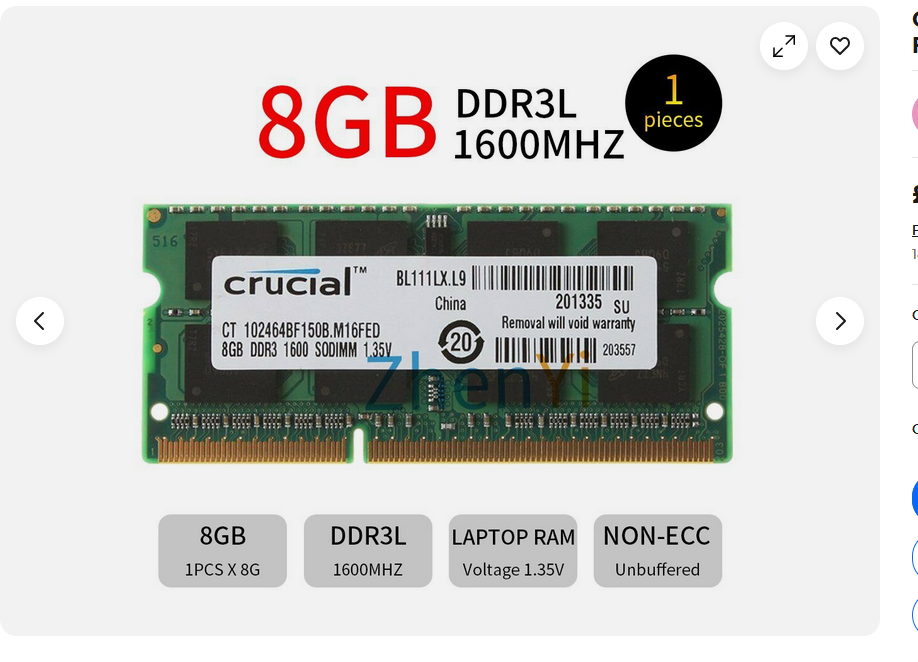
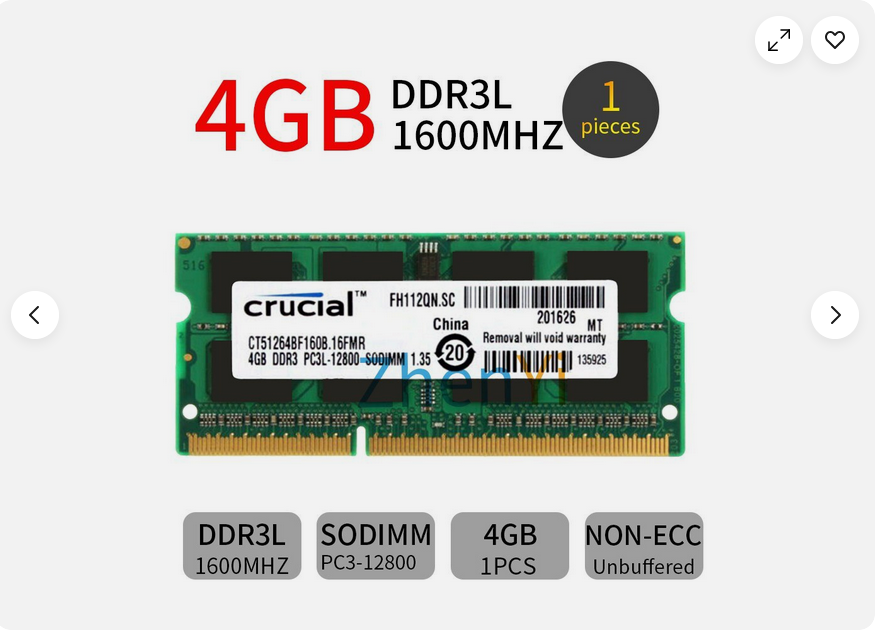
I have seen these two on eBay (4gb and 8gb) but I will open the back
cover to see if there are two slots or only one slot.
<https://postimg.cc/rK4RNcsV> <https://i.postimg.cc/yYQhB8zZ/2026-06-07-22-07-52.png>
<https://postimg.cc/ykTsHrr3> <https://i.postimg.cc/15ktDkGB/2026-06-07-22-08-56.png>
If the laptop has only one slot then I will get the 8gb version;
otherwise 4gb.
On 2026-06-07 22:20, Simon wrote:
I have seen these two on eBay (4gb and 8gb) but I will open the back
cover to see if there are two slots or only one slot.
<https://postimg.cc/rK4RNcsV>
<https://i.postimg.cc/yYQhB8zZ/2026-06-07-22-07-52.png>
<https://postimg.cc/ykTsHrr3>
<https://i.postimg.cc/15ktDkGB/2026-06-07-22-08-56.png>
If the laptop has only one slot then I will get the 8gb version;
otherwise 4gb.
Note that both those are 1600MHz, whereas the machine spec is 1333MHz. I
was uncertain as to whether 1600MHz would work in a 1333MHz machine and
had my doubts, but this suggests it should work:
<https://www.google.com/search?q=can+1600MHz+RAM+work+in+a+1333MHz+machine>
However, as AI sometimes lies, hopefully Paul or A N Other will
contradict it if it's happening here.
On 07/06/2026 23:21, Hank Rogers wrote:
The only additional advise I would give is to check the bios and be
sure it is flashed with the latest version that dell issued for this
old laptop.
This is the problem Dell doesn't provide bios for Linux systems. They
have for Windows but not for Ubuntu. The exe file can't work in Linux
unless you know a work around.
On 07/06/2026 23:21, Hank Rogers wrote:
The only additional advise I would give is to check the bios and beThis is the problem Dell doesn't provide bios for Linux systems. They
sure it is flashed with the latest version that dell issued for this
old laptop.
have for Windows but not for Ubuntu. The exe file can't work in Linux
unless you know a work around.
On 07/06/2026 22:49, Java Jive wrote:
NO!˙ The following is for 1600MHz RAM, but, as Paul points out below,
I missed the fact in the specs PDF that the two models covered have
different requirements:
Memory
˙˙˙˙˙˙˙˙˙˙˙˙˙˙˙˙˙˙˙˙˙˙˙˙˙˙ Inspiron 15-3551˙˙˙˙˙˙˙˙˙˙˙ Inspiron 15-3558
Slots:˙˙˙˙˙˙˙˙˙˙˙˙˙˙˙˙˙˙˙ One SODIMM slot˙˙˙˙˙˙˙˙˙˙˙˙ Two SODIMM slots
Type:˙˙˙˙˙˙˙˙˙˙˙˙˙˙˙˙˙˙˙˙ DDR3L˙˙˙˙˙˙˙˙˙˙˙˙˙˙˙˙˙˙˙˙˙˙ Dual?channel DDR3L
Speed:˙˙˙˙˙˙˙˙˙˙˙˙˙˙˙˙˙˙˙ 1333 MHz˙˙˙˙˙˙˙˙˙˙˙˙˙˙˙˙˙˙˙ 1600 MHz
Configurations supported: 2 GB and 4 GB˙˙˙˙˙˙˙˙˙˙˙˙˙˙ 2, 4, 6, 8 GB
If the specs document is to be believed, as you have the 15-3551 model
in the left hand column and already have 4GB, then you can't upgrade
it further, and if you wish to try, then I think you'd need 1333MHz
RAM, NOT the 1600MHz I linked below in my previous post:
It's all Greek to me! This video shows 8 GB of RAM: <https://youtu.be/qgquebWd81I>.
Such is life with Dell. They seem to sell machines with different specifications in different countries.
I bought this a few years ago to try Linux, and the price was right, so
I bought it. Recently, I installed Ubuntu 26.04 on it, but with only 4
GB of RAM, it is very slow. The minimum requirement for Ubuntu 26.04 is
6 GB, so I thought upgrading the machine would work. Otherwise, I can install Windows 8.1 on it, but only if it has 8 GB of RAM. I have an 8.1 retail licence, so I am hoping it will still activate.
Most old dells were typically flashed by booting a dos floppy or usb
stick with the flash file copied onto it, and simply executing that
flash file from a dos command prompt.˙ Freedos works too. Either can be generated using the rufus program.˙ Then copy your flash file on it,
boot from it and run the flash.
On 07/06/2026 22:49, Java Jive wrote:
NO!˙ The following is for 1600MHz RAM, but, as Paul points out below, I missed the fact in the specs PDF that the two models covered have different requirements:
Memory
˙˙˙˙˙˙˙˙˙˙˙˙˙˙˙˙˙˙˙˙˙˙˙˙˙˙ Inspiron 15-3551˙˙˙˙˙˙˙˙˙˙˙ Inspiron 15-3558
Slots:˙˙˙˙˙˙˙˙˙˙˙˙˙˙˙˙˙˙˙ One SODIMM slot˙˙˙˙˙˙˙˙˙˙˙˙ Two SODIMM slots
Type:˙˙˙˙˙˙˙˙˙˙˙˙˙˙˙˙˙˙˙˙ DDR3L˙˙˙˙˙˙˙˙˙˙˙˙˙˙˙˙˙˙˙˙˙˙ Dual?channel DDR3L
Speed:˙˙˙˙˙˙˙˙˙˙˙˙˙˙˙˙˙˙˙ 1333 MHz˙˙˙˙˙˙˙˙˙˙˙˙˙˙˙˙˙˙˙ 1600 MHz
Configurations supported: 2 GB and 4 GB˙˙˙˙˙˙˙˙˙˙˙˙˙˙ 2, 4, 6, 8 GB
If the specs document is to be believed, as you have the 15-3551 model in the left hand column and already have 4GB, then you can't upgrade it further, and if you wish to try, then I think you'd need 1333MHz RAM, NOT the 1600MHz I linked below in my previous post:
It's all Greek to me! This video shows 8 GB of RAM: <https://youtu.be/qgquebWd81I>.
Such is life with Dell. They seem to sell machines with different specifications in different countries.
I bought this a few years ago to try Linux, and the price was right, so I bought it. Recently, I installed Ubuntu 26.04 on it, but with only 4 GB of RAM, it is very slow. The minimum requirement for Ubuntu 26.04 is 6 GB, so I thought upgrading the machine would work. Otherwise, I can install Windows 8.1 on it, but only if it has 8 GB of RAM. I have an 8.1 retail licence, so I am hoping it will still activate.
On 07/06/2026 22:49, Java Jive wrote:
NO!˙ The following is for 1600MHz RAM, but, as Paul points out below,
I missed the fact in the specs PDF that the two models covered have
different requirements:
Memory
˙˙˙˙˙˙˙˙˙˙˙˙˙˙˙˙˙˙˙˙˙˙˙˙˙˙ Inspiron 15-3551˙˙˙˙˙˙˙˙˙˙˙ Inspiron 15-3558
Slots:˙˙˙˙˙˙˙˙˙˙˙˙˙˙˙˙˙˙˙ One SODIMM slot˙˙˙˙˙˙˙˙˙˙˙˙ Two SODIMM slots
Type:˙˙˙˙˙˙˙˙˙˙˙˙˙˙˙˙˙˙˙˙ DDR3L˙˙˙˙˙˙˙˙˙˙˙˙˙˙˙˙˙˙˙˙˙˙ Dual?channel DDR3L
Speed:˙˙˙˙˙˙˙˙˙˙˙˙˙˙˙˙˙˙˙ 1333 MHz˙˙˙˙˙˙˙˙˙˙˙˙˙˙˙˙˙˙˙ 1600 MHz
Configurations supported: 2 GB and 4 GB˙˙˙˙˙˙˙˙˙˙˙˙˙˙ 2, 4, 6, 8 GB
If the specs document is to be believed, as you have the 15-3551 model
in the left hand column and already have 4GB, then you can't upgrade
it further, and if you wish to try, then I think you'd need 1333MHz
RAM, NOT the 1600MHz I linked below in my previous post:
It's all Greek to me! This video shows 8 GB of RAM: <https://youtu.be/ qgquebWd81I>.
Such is life with Dell. They seem to sell machines with different specifications in different countries.
I bought this a few years ago to try Linux, and the price was right, so
I bought it. Recently, I installed Ubuntu 26.04 on it, but with only 4
GB of RAM, it is very slow. The minimum requirement for Ubuntu 26.04 is
6 GB, so I thought upgrading the machine would work. Otherwise, I can install Windows 8.1 on it, but only if it has 8 GB of RAM. I have an 8.1 retail licence, so I am hoping it will still activate.
On 2026-06-08 00:16, Simon wrote:
On 07/06/2026 22:49, Java Jive wrote:
NO!˙ The following is for 1600MHz RAM, but, as Paul points out below, I missed the fact in the specs PDF that the two models covered have different requirements:
Memory
˙˙˙˙˙˙˙˙˙˙˙˙˙˙˙˙˙˙˙˙˙˙˙˙˙˙ Inspiron 15-3551˙˙˙˙˙˙˙˙˙˙˙ Inspiron 15-3558
Slots:˙˙˙˙˙˙˙˙˙˙˙˙˙˙˙˙˙˙˙ One SODIMM slot˙˙˙˙˙˙˙˙˙˙˙˙ Two SODIMM slots
Type:˙˙˙˙˙˙˙˙˙˙˙˙˙˙˙˙˙˙˙˙ DDR3L˙˙˙˙˙˙˙˙˙˙˙˙˙˙˙˙˙˙˙˙˙˙ Dual?channel DDR3L >>> Speed:˙˙˙˙˙˙˙˙˙˙˙˙˙˙˙˙˙˙˙ 1333 MHz˙˙˙˙˙˙˙˙˙˙˙˙˙˙˙˙˙˙˙ 1600 MHz
Configurations supported: 2 GB and 4 GB˙˙˙˙˙˙˙˙˙˙˙˙˙˙ 2, 4, 6, 8 GB
If the specs document is to be believed, as you have the 15-3551 model in the left hand column and already have 4GB, then you can't upgrade it further, and if you wish to try, then I think you'd need 1333MHz RAM, NOT the 1600MHz I linked below in my previous post:
It's all Greek to me! This video shows 8 GB of RAM: <https://youtu.be/ qgquebWd81I>.
Such is life with Dell. They seem to sell machines with different specifications in different countries.
I bought this a few years ago to try Linux, and the price was right, so I bought it. Recently, I installed Ubuntu 26.04 on it, but with only 4 GB of RAM, it is very slow. The minimum requirement for Ubuntu 26.04 is 6 GB, so I thought upgrading the machine would work. Otherwise, I can install Windows 8.1 on it, but only if it has 8 GB of RAM. I have an 8.1 retail licence, so I am hoping it will still activate.
Is it using a rotating rust hard disk, or an SSD?
If it has a traditional hard disk, upgrade to an SSD, and the machine will be faster. Use Swap.
TinyCore as an OS, would be a lot more spartan than this.
It would only be for evaluation, as a web browser only environment maybe.
All depends on how the video driver thing, works out or not there.
Paul
And it seems the various companies
who made OEM laptops, they all liked their screws. Something
like 17 screws in the bottom of that one. And it still needs
a spudger to pry it apart.
| Sysop: | Tetrazocine |
|---|---|
| Location: | Melbourne, VIC, Australia |
| Users: | 11 |
| Nodes: | 8 (0 / 8) |
| Uptime: | 169:04:07 |
| Calls: | 219 |
| Files: | 21,503 |
| Messages: | 83,448 |