• Pop-up dialogue appearing spontaneously

    From NY@3:633/10 to All on Mon Apr 20 17:00:44 2026
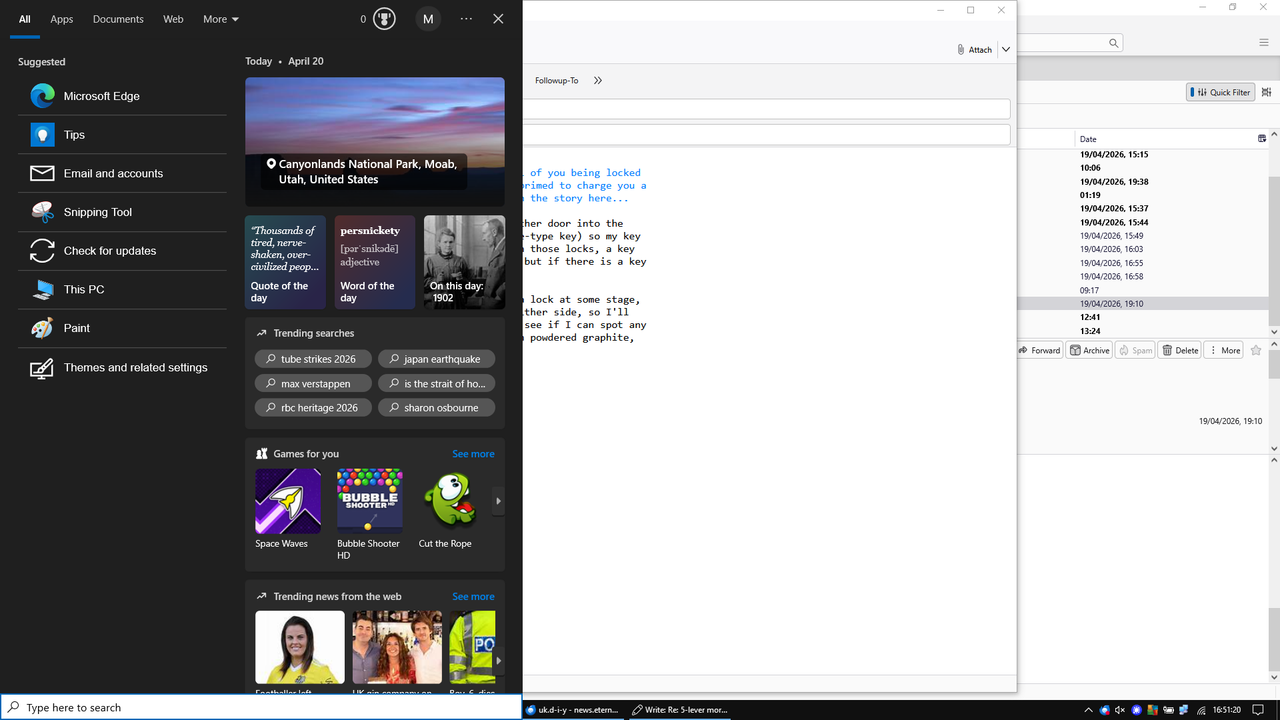
    My Win 10 laptop has recently (last few days) started popping up a large
    black dialogue box over the left hand half of the screen

    https://i.postimg.cc/rsVPTmGc/Image1.png

    It happens while I am using other program, sometimes while I am not even touching the keyboard (so it's not a random combination of keys that is causing it).

    I have Classic Shell installed but that is still working normally. The dialogue that is popping up is not the native Win 10 one which (with
    Classic Shell) you can access by Shift-clicking on the Start button.

    Any suggestion what the intrusive program is, and a way of disabling it.
    It is modal, in that while it is displayed, you cannot interact with any
    other open app or any shortcuts on the task bar or Quick Launch bar, so
    it is Bloody Annoying...

    --- PyGate Linux v1.5.14
    * Origin: Dragon's Lair, PyGate NNTP<>Fido Gate (3:633/10)
  • From Java Jive@3:633/10 to All on Mon Apr 20 17:22:09 2026
    On 2026-04-20 17:00, NY wrote:
    My Win 10 laptop has recently (last few days) started popping up a large black dialogue box over the left hand half of the screen

    https://i.postimg.cc/rsVPTmGc/Image1.png

    It happens while I am using other program, sometimes while I am not even touching the keyboard (so it's not a random combination of keys that is causing it).

    I have Classic Shell installed but that is still working normally. The dialogue that is popping up is not the native Win 10 one which (with
    Classic Shell) you can access by Shift-clicking on the Start button.

    Any suggestion what the intrusive program is, and a way of disabling it.
    It is modal, in that while it is displayed, you cannot interact with any other open app or any shortcuts on the task bar or Quick Launch bar, so
    it is Bloody Annoying...

    Looks like the popup that is displayed by hovering over one of the
    system tray icons, or rather more correctly, an icon usually next to the System Tray, depending on how you have your TaskBar arranged. ATM I'm
    in W7 and can't easily go into W10 or W11 to check what it is called,
    but IMS it's the Widgets icon. In the popup itself, you can customise
    what it displays, etc, and, in the W10/11 settings, whether it is
    launched at login.

    --

    Fake news kills!

    I may be contacted via the contact address given on my website: www.macfh.co.uk


    --- PyGate Linux v1.5.14
    * Origin: Dragon's Lair, PyGate NNTP<>Fido Gate (3:633/10)
  • From Paul@3:633/10 to All on Mon Apr 20 12:42:47 2026
    On Mon, 4/20/2026 12:00 PM, NY wrote:
    My Win 10 laptop has recently (last few days) started popping up a large black dialogue box over the left hand half of the screen

    https://i.postimg.cc/rsVPTmGc/Image1.png

    It happens while I am using other program, sometimes while I am not even touching the keyboard (so it's not a random combination of keys that is causing it).

    I have Classic Shell installed but that is still working normally. The dialogue that is popping up is not the native Win 10 one which (with Classic Shell) you can access by Shift-clicking on the Start button.

    Any suggestion what the intrusive program is, and a way of disabling it. It is modal, in that while it is displayed, you cannot interact with any other open app or any shortcuts on the task bar or Quick Launch bar, so it is Bloody Annoying...

    It bears some resemblance to the decorations on the Search box. I'm going
    by the "all apps documents web more" at the top, and the silly Reward icon
    on the right.

    https://www.pcmag.com/how-to/find-things-faster-how-to-search-in-windows

    Note that Microsoft installed some booby-traps on their toys,
    in the form of a "Hover" setting. If Hover is enable, it's a possibility
    that the cursor position is doing it.

    The thing that blocks the whole screen, is the Win10 end of life,
    and the executable there, begins with "ru..." or so. Doing a ctrl-alt-delete and bringing up the Task Manager, you should be able to find
    that one. There are a pair of things beginning with "r..." that start
    and are associated with the hijacking. At one point, it might even
    have been blocking ctrl-alt-delete (they can do that), but later
    it seemed I could kill it OK.

    Maybe your "modal behavior" is related to Classic Shell,
    I don't use that so cannot confirm one way or another.

    Paul

    --- PyGate Linux v1.5.14
    * Origin: Dragon's Lair, PyGate NNTP<>Fido Gate (3:633/10)
  • From NY@3:633/10 to All on Mon Apr 20 19:04:06 2026
    On 20/04/2026 17:42, Paul wrote:
    On Mon, 4/20/2026 12:00 PM, NY wrote:
    My Win 10 laptop has recently (last few days) started popping up a large black dialogue box over the left hand half of the screen

    https://i.postimg.cc/rsVPTmGc/Image1.png

    It happens while I am using other program, sometimes while I am not even touching the keyboard (so it's not a random combination of keys that is causing it).

    I have Classic Shell installed but that is still working normally. The dialogue that is popping up is not the native Win 10 one which (with Classic Shell) you can access by Shift-clicking on the Start button.

    Any suggestion what the intrusive program is, and a way of disabling it. It is modal, in that while it is displayed, you cannot interact with any other open app or any shortcuts on the task bar or Quick Launch bar, so it is Bloody Annoying...

    It bears some resemblance to the decorations on the Search box. I'm going
    by the "all apps documents web more" at the top, and the silly Reward icon
    on the right.

    https://www.pcmag.com/how-to/find-things-faster-how-to-search-in-windows

    There's a three-dots icon at the top RHS of the popup window and it
    brings up a screen relating to searching where you can configure what it searches but not turn it off.

    I went into services.msc and stopped the Windows Search service (to see whether it made any difference, prior to preventing it starting on
    reboot). Lo and behold, as I was typing this reply, the window opened,
    though now it's only half height. I've confirmed in services.msc that it
    had not restarted itself.

    So it looks as if its something else.

    The window now seems to close itself spontaneously after a few seconds,
    and it no longer modal.

    --- PyGate Linux v1.5.14
    * Origin: Dragon's Lair, PyGate NNTP<>Fido Gate (3:633/10)
  • From Paul@3:633/10 to All on Mon Apr 20 15:46:30 2026
    On Mon, 4/20/2026 2:04 PM, NY wrote:
    On 20/04/2026 17:42, Paul wrote:
    On Mon, 4/20/2026 12:00 PM, NY wrote:
    My Win 10 laptop has recently (last few days) started popping up a large black dialogue box over the left hand half of the screen

    https://i.postimg.cc/rsVPTmGc/Image1.png

    It happens while I am using other program, sometimes while I am not even touching the keyboard (so it's not a random combination of keys that is causing it).

    I have Classic Shell installed but that is still working normally. The dialogue that is popping up is not the native Win 10 one which (with Classic Shell) you can access by Shift-clicking on the Start button.

    Any suggestion what the intrusive program is, and a way of disabling it. It is modal, in that while it is displayed, you cannot interact with any other open app or any shortcuts on the task bar or Quick Launch bar, so it is Bloody Annoying...

    It bears some resemblance to the decorations on the Search box. I'm going
    by the "all apps documents web more" at the top, and the silly Reward icon >> on the right.

    ÿÿÿ https://www.pcmag.com/how-to/find-things-faster-how-to-search-in-windows

    There's a three-dots icon at the top RHS of the popup window and it brings up a screen relating to searching where you can configure what it searches but not turn it off.

    I went into services.msc and stopped the Windows Search service (to see whether it made any difference, prior to preventing it starting on reboot). Lo and behold, as I was typing this reply, the window opened, though now it's only half height. I've confirmed in services.msc that it had not restarted itself.

    So it looks as if its something else.

    The window now seems to close itself spontaneously after a few seconds, and it no longer modal.

    Some things in Windows, use things like "dllhost" to launch.
    Not all launches are EXE or BAT. There are several things
    like the dllhost that can be used to hide the actor.

    Process Monitor isn't good at everything. Process Explorer can
    show the command that the dllhost is launched with.

    But if this is a pest, it doesn't have to be easy to track.

    There is a three-finger-tap on the Touchpad mentioned here.

    https://support.microsoft.com/en-us/windows/prevent-windows-search-from-randomly-launching-cf350644-078c-4059-98f5-3cf725b89b22

    Is there a switch where you can switch off Classic Shell for one boot cycle, to test ?

    And now that it is no longer modal, open Task Manager when it appears,
    and wave your mouse over the pane of the thing, then see if the %CPU
    on some item increases in response.

    Paul

    --- PyGate Linux v1.5.14
    * Origin: Dragon's Lair, PyGate NNTP<>Fido Gate (3:633/10)
  • From NY@3:633/10 to All on Mon Apr 20 22:02:34 2026
    On 20/04/2026 20:46, Paul wrote:
    There is a three-finger-tap on the Touchpad mentioned here.

    I wouldn't be that because I use a plug-in mouse rather than the
    touchpad, and also I always turn tapping off on a touchpad, even if I occasionally use it for mouse movements, because I get a lot of phantom
    left clicks on things as I repeatedly scroll from one side of the pad to
    the other to move the mouse all the way across the screen.

    However... when I turned on my laptop's sound to watch a Youtube video,
    I sometimes heard a flurry of USB device plugged-in/unplugged sounds, so
    I wonder if the mouse cable or plug has a dodgy connection. Time to try another mouse - maybe my mouse is simulating some obscure keystroke combination...

    https://support.microsoft.com/en-us/windows/prevent-windows-search-from-randomly-launching-cf350644-078c-4059-98f5-3cf725b89b22

    Is there a switch where you can switch off Classic Shell for one boot cycle, to test ?

    I wonder... Worth a try.

    And now that it is no longer modal, open Task Manager when it appears,
    and wave your mouse over the pane of the thing, then see if the %CPU
    on some item increases in response.

    Yes I looked at that and couldn't see any change in the top CPU-using processes when the rogue dialogue appeared and later disappeared.


    It goes in phases. Earlier this evening, I was getting it once or twice
    a minute at worst and every minute or so at best (randomly, not at fixed intervals...) and now it's one away. Similarly earlier today it was
    doing it often enough for me to bother posting the original question,
    then went away. "Belly rubbing on touchpad" when I'm using the laptop literally on my lap while lying in bed - that cannot be discounted ;-)

    --- PyGate Linux v1.5.14
    * Origin: Dragon's Lair, PyGate NNTP<>Fido Gate (3:633/10)
  • From VanguardLH@3:633/10 to All on Mon Apr 20 17:01:23 2026
    NY <me@privacy.net> wrote:

    My Win 10 laptop has recently (last few days) started popping up a large black dialogue box over the left hand half of the screen

    https://i.postimg.cc/rsVPTmGc/Image1.png

    It happens while I am using other program, sometimes while I am not even touching the keyboard (so it's not a random combination of keys that is causing it).

    I have Classic Shell installed but that is still working normally. The dialogue that is popping up is not the native Win 10 one which (with
    Classic Shell) you can access by Shift-clicking on the Start button.

    Any suggestion what the intrusive program is, and a way of disabling it.
    It is modal, in that while it is displayed, you cannot interact with any other open app or any shortcuts on the task bar or Quick Launch bar, so
    it is Bloody Annoying...

    Use SysInternals' Process Explorer (PE) to determine what process owns
    (has a handle) to the enigmatic window. In PE's toolbar is a sniper
    cross-hair icon. Click on it, and then click on the window. PE will
    highlight the process that owns that window.

    https://learn.microsoft.com/en-us/sysinternals/downloads/process-explorer

    My guess is what you're seeing is the Start Menu. If it appears when
    you have not touched the keyboard, and you're not using some keyboard
    macro program (e.g., AutoHotkey, AutoIt), try a different keyboard.
    Maybe the Start key is sticking on your current keyboard. You could
    check for lint or other debris stuck under the Start key.

    The Start Menu you are seeing is for Windows 11, but you posted in a
    Windows 10 newsgroup. Are you using a Start Menu alternative, like
    Stardock's Start10/11? You said you are using ClassicShell, but I never bothered with it, and don't know how it may modify the Start Menu. For modifying the Start Menu, I recommend using Start10/11 which uses their
    own code instead of ClassicShell, and several others, that attempt to
    implement registry hacks to make changes hence are far more susceptible
    to changes made by Microsoft when updating/changing Windows. Obviously
    you could [temporarily] disable ClassicShell (and Start10/11, or any
    other Start Menu modifier) to see if you found yet another defect with ClassicShell, like it intercepts a hotkey combo that you expect to have
    effect in another program.

    --- PyGate Linux v1.5.14
    * Origin: Dragon's Lair, PyGate NNTP<>Fido Gate (3:633/10)
  • From J. P. Gilliver@3:633/10 to All on Tue Apr 21 01:37:38 2026
    On 2026/4/20 23:1:23, VanguardLH wrote:
    []
    Use SysInternals' Process Explorer (PE) to determine what process owns
    (has a handle) to the enigmatic window. In PE's toolbar is a sniper cross-hair icon. Click on it, and then click on the window. PE will highlight the process that owns that window.

    https://learn.microsoft.com/en-us/sysinternals/downloads/process-explorer

    Good tip.

    My guess is what you're seeing is the Start Menu. If it appears when

    Yes, I thought it looked like a start menu.
    []
    If it is, and he uses your tip above, what process will show?
    --
    J. P. Gilliver. UMRA: 1960/<1985 MB++G()ALIS-Ch++(p)Ar++T+H+Sh0!:`)DNAf

    "The problem with socialism is that you eventually run out of other
    people's money."

    --- PyGate Linux v1.5.14
    * Origin: Dragon's Lair, PyGate NNTP<>Fido Gate (3:633/10)
  • From Paul@3:633/10 to All on Mon Apr 20 20:54:04 2026
    On Mon, 4/20/2026 8:37 PM, J. P. Gilliver wrote:
    On 2026/4/20 23:1:23, VanguardLH wrote:
    []
    Use SysInternals' Process Explorer (PE) to determine what process owns
    (has a handle) to the enigmatic window. In PE's toolbar is a sniper
    cross-hair icon. Click on it, and then click on the window. PE will
    highlight the process that owns that window.

    https://learn.microsoft.com/en-us/sysinternals/downloads/process-explorer

    Good tip.

    My guess is what you're seeing is the Start Menu. If it appears when

    Yes, I thought it looked like a start menu.
    []
    If it is, and he uses your tip above, what process will show?


    https://en.wikipedia.org/wiki/Windows_shell

    "In Windows 10, the Windows Shell Experience Host interface drives
    visuals like the Start Menu, Action Center, Taskbar, and Task View/Timeline.
    "

    That's the problem with trying to identify the culprit via naming convention. They couldn't have "StartMenu.exe" and "ActionCenter.exe" as that would be
    too simple.

    And it also wouldn't do that by itself, as it needs WebView2 (MSEdge instance) for rendering HTML/JS code.

    Paul

    --- PyGate Linux v1.5.14
    * Origin: Dragon's Lair, PyGate NNTP<>Fido Gate (3:633/10)
  • From VanguardLH@3:633/10 to All on Mon Apr 20 20:35:05 2026
    "J. P. Gilliver" <G6JPG@255soft.uk> wrote:

    VanguardLH wrote:

    Use SysInternals' Process Explorer (PE) to determine what process owns
    (has a handle) to the enigmatic window. In PE's toolbar is a sniper
    cross-hair icon. Click on it, and then click on the window. PE will
    highlight the process that owns that window.

    https://learn.microsoft.com/en-us/sysinternals/downloads/process-explorer

    Good tip.

    My guess is what you're seeing is the Start Menu. If it appears when

    Yes, I thought it looked like a start menu. If it is, and he uses your
    tip above, what process will show?

    PE would show some system executable (.exe or .dll, or whatever is the
    caller to them). Unfortunately, if it is a popup window from the
    Windows taskbar (managed by explorer.exe which is the taskbar and
    desktop manager plus the file manager), it will disappear the moment you
    click on the spider toolbar icon in PE. When focus leave the Start Menu
    popup, it disappears.

    I wrote the PE mention before looking at the screenshot which is what I remember seeing on another user's desktop PC that has Windows 11 (I'm
    still back on Windows 10); however, I did play around with Start 11 on
    her desktop, and remember seeing that version of the Start Menu (as I
    recall, you selected to see all programs to get that particular view of
    the Start Menu). But, I think, it was the view shown by Start 11, and
    not the native one from Microsoft. Been too long to be sure. Since the
    OP mentioned using ClassicShell, and it modifies the Start Menu, could
    be the OP has ClassicShell show a modified Start Menu, or is
    incorporating yet more software to modify the Start Menu.

    --- PyGate Linux v1.5.14
    * Origin: Dragon's Lair, PyGate NNTP<>Fido Gate (3:633/10)
  • From NY@3:633/10 to All on Tue Apr 21 08:14:39 2026
    On 20/04/2026 23:01, VanguardLH wrote:
    The Start Menu you are seeing is for Windows 11, but you posted in a
    Windows 10 newsgroup.
    It's definitely Win10 - Control Panel | System says Win 10 Home and
    there's a big "Windows 10 / HP" logo on the RHS of that page (laptop is
    made by HP so I imagine they have managed to put their branding on that
    page).

    I wonder if something has upgraded the start menu to the Win 11 one -
    very sinister if it has...

    --- PyGate Linux v1.5.14
    * Origin: Dragon's Lair, PyGate NNTP<>Fido Gate (3:633/10)
  • From NY@3:633/10 to All on Tue Apr 21 08:21:23 2026
    On 21/04/2026 02:35, VanguardLH wrote:
    I wrote the PE mention before looking at the screenshot which is what I remember seeing on another user's desktop PC that has Windows 11 (I'm
    still back on Windows 10); however, I did play around with Start 11 on
    her desktop, and remember seeing that version of the Start Menu (as I
    recall, you selected to see all programs to get that particular view of
    the Start Menu). But, I think, it was the view shown by Start 11, and
    not the native one from Microsoft. Been too long to be sure. Since the
    OP mentioned using ClassicShell, and it modifies the Start Menu, could
    be the OP has ClassicShell show a modified Start Menu, or is
    incorporating yet more software to modify the Start Menu.

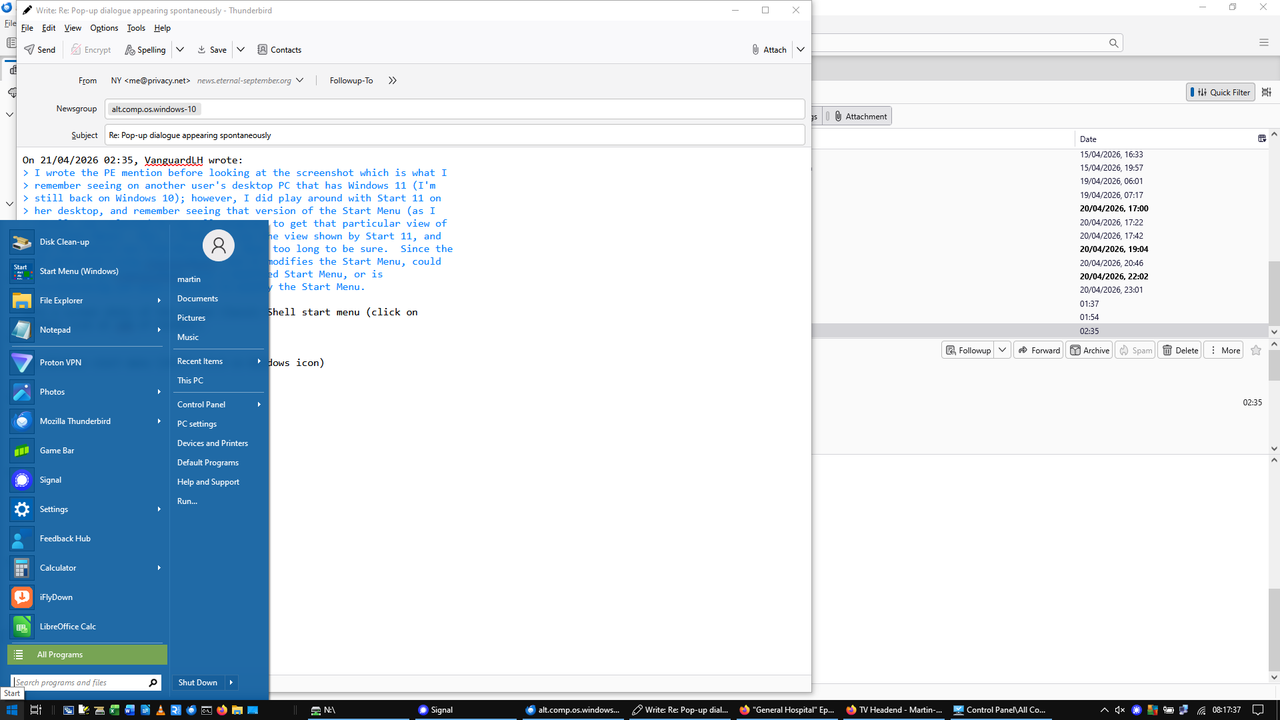
    Here a screen shots of the normal Classic Shell start menu (click on
    Windows icon at LHS of taskbar)

    https://i.postimg.cc/VsgsVytT/Image1.png

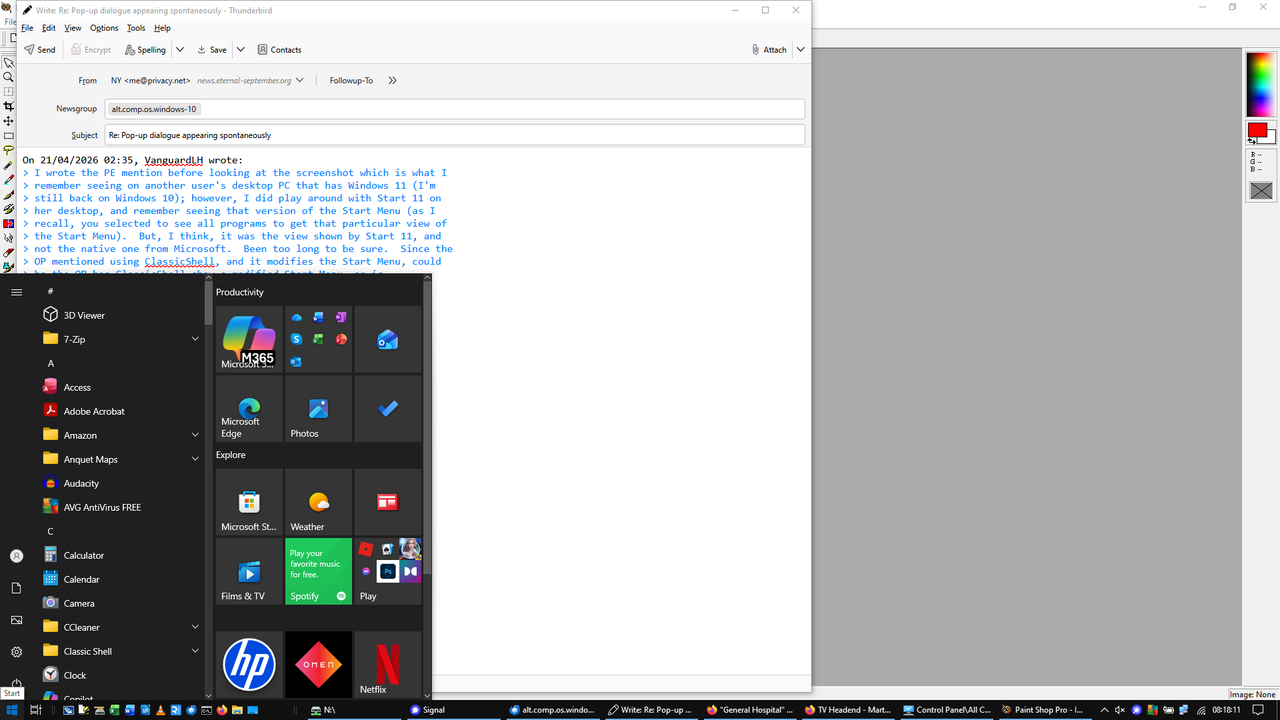
    and Windows start menu (shift-click on Windows icon)

    https://i.postimg.cc/mr7B3KRj/Image2.png

    The second one is different to the popup that was appearing
    spontaneously, from my original posting.

    If the popup is the Win 11 start menu and I've got Win 10, there's
    something weird going on...

    --- PyGate Linux v1.5.14
    * Origin: Dragon's Lair, PyGate NNTP<>Fido Gate (3:633/10)
  • From VanguardLH@3:633/10 to All on Tue Apr 21 03:45:15 2026
    NY <me@privacy.net> wrote:

    Here a screen shots of the normal Classic Shell start menu (click on
    Windows icon at LHS of taskbar)

    https://i.postimg.cc/VsgsVytT/Image1.png

    and Windows start menu (shift-click on Windows icon)

    https://i.postimg.cc/mr7B3KRj/Image2.png

    The second one is different to the popup that was appearing
    spontaneously, from my original posting.

    If the popup is the Win 11 start menu and I've got Win 10, there's
    something weird going on...

    Paul was thinking the popup was for the Windows search by using the
    search box in the taskbar. In your original message with a screenshot,
    there is a "Type here to search" box in the taskbar.

    I turned off the taskbar search box long ago. It is superfluous. I
    just have to tap the Start key to show the Start Menu, and it will
    search on whatever I type, so the search box is superfluous.

    Win+C is the hotkey to open/focus on the taskbar search box. That
    assumes Copilot is disabled (which it is on my Win10 host). If Copilot
    is still enabled, Win+C brings up Copilot.

    Hmm, I just found a hotkey that opens the dialog you presented in your
    first screenshot: Win+Q. That's the hotkey for QuickSearch. I've never
    used nor wanted that popup, so I found its hotkey at:

    https://support.microsoft.com/en-us/windows/keyboard-shortcuts-in-windows-dcc61a57-8ff0-cffe-9796-cb9706c75eec

    Maybe you're hitting Win+Q in a program thinking it will do something
    there, but Windows intercepts the hotkey to show its QuickSearch popup.
    Or you thought you hit Ctrl+Q, but hit Win+Q instead.

    You use a mouse instead of the touchpad, but did you actually disable
    the touchpad (in Device Manager)?

    https://support.microsoft.com/en-us/windows/prevent-windows-search-from-randomly-launching-cf350644-078c-4059-98f5-3cf725b89b22

    I don't have a touchpad on my desktop PC, so the touchpad settings
    aren't available. The above article mentions how to decide what a
    3-finger tap will do. Change from "Launch Windows Search" to "Nothing".

    --- PyGate Linux v1.5.14
    * Origin: Dragon's Lair, PyGate NNTP<>Fido Gate (3:633/10)
  • From Java Jive@3:633/10 to All on Tue Apr 21 13:39:45 2026
    On 2026-04-20 17:00, NY wrote:

    My Win 10 laptop has recently (last few days) started popping up a large black dialogue box over the left hand half of the screen

    https://i.postimg.cc/rsVPTmGc/Image1.png

    It happens while I am using other program, sometimes while I am not even touching the keyboard (so it's not a random combination of keys that is causing it).

    I have Classic Shell installed but that is still working normally. The dialogue that is popping up is not the native Win 10 one which (with
    Classic Shell) you can access by Shift-clicking on the Start button.

    Any suggestion what the intrusive program is, and a way of disabling it.
    It is modal, in that while it is displayed, you cannot interact with any other open app or any shortcuts on the task bar or Quick Launch bar, so
    it is Bloody Annoying...

    After examining your OP and rereading the posts of others, I've just
    gone into W10 on another PC and taken some screenshots, all of which
    bear some resemblance to yours, but none match exactly. In what
    follows, I shall number your screenshots in the order that you posted
    them as follows: (1), (2), etc - although I expect only to need to
    refer back to (1), the screenshot in your OP, and I'll label mine with
    letters to differentiate between them and yours.

    If I have the search box visible, which it is by default but I usually
    hide it, this is what I get when I click in the left hand end of it ...

    A: https://www.macfh.co.uk/Temp/W10-Search-Click-Left.png

    ... while this is what I get if I hover over the vague pretence at an
    icon at the right hand end of it (it's supposed to represent the Lyrid
    Meteor Shower, but who knew just by looking at it?!) ...

    B: https://www.macfh.co.uk/Temp/W10-Search-Hover-Right.png

    This is what I get if I hover over what I called the 'widgets' icon in
    my first post, the icon next to the System Tray, which throughout these
    three screen grabs displays variously as weather or pollen count ...

    C: https://www.macfh.co.uk/Temp/W10-Widgets.png

    Some things to note:

    + Both (A) and (B) have a similar left hand side to your (1)

    * (B) has on the right hand side similar web content to your (1) and
    that of (C)'s left hand side, which is what caught my eye on first
    examining (1).

    - The top right hand corner of (1) doesn't resemble the top right hand
    corner of either (A) or (B), in fact it resembles more the top right
    hand corner of (C).

    So I agree with those who have said it's something to do with the Search
    Box on the Taskbar, but the differences above have to be explained,
    which I suspect mostly they can be as follows ...

    My version of W10 is NOT linked to a Microsoft online account, but I
    suspect yours IS? This might explain the differences between the top
    right hand corners of (1) and (B). As far as (C) is concerned, I'm not
    logged in there either, but the widgets create a default profile anyway,
    hence the closer similarity than either (A) or (B) of the top right hand corner of (C) to that of (1).

    As for the unexpected pop-up behaviour, you can disable it by two
    methods. If you want to keep the Search Box visible but not have
    results pop up unexpectedly, <rt-click> the Task Bar, 'Search', click to
    clear the tick by 'Open on hover'. Alternatively, as others have
    mentioned and as I do, just hide the Search Bar altogether by again a <rt-click> on the Task Bar, Search, click Hidden.

    HTHs

    --

    Fake news kills!

    I may be contacted via the contact address given on my website: www.macfh.co.uk


    --- PyGate Linux v1.5.14
    * Origin: Dragon's Lair, PyGate NNTP<>Fido Gate (3:633/10)
  • From ...w¡ñ?±?ñ@3:633/10 to All on Tue Apr 21 09:32:21 2026
    On 4/20/2026 3:01 PM, VanguardLH wrote:
    NY <me@privacy.net> wrote:

    My Win 10 laptop has recently (last few days) started popping up a large
    black dialogue box over the left hand half of the screen

    https://i.postimg.cc/rsVPTmGc/Image1.png

    My guess is what you're seeing is the Start Menu.

    It's the Search box.
    Located on the Task Bar(Icon only, or Icon+Label or Search Box)

    Normal settings for least intrusion are:
    Task View Off, Widgets Off, Search History Off, Search Highlights Off,
    Search My Accounts Off


    --
    ...w­¤?ñ?¤

    --- PyGate Linux v1.5.14
    * Origin: Dragon's Lair, PyGate NNTP<>Fido Gate (3:633/10)
  • From VanguardLH@3:633/10 to All on Tue Apr 21 16:54:58 2026
    winston <winstonmvp@gmail.com> wrote:

    VanguardLH wrote:

    NY <me@privacy.net> wrote:

    My Win 10 laptop has recently (last few days) started popping up a large >>> black dialogue box over the left hand half of the screen

    https://i.postimg.cc/rsVPTmGc/Image1.png

    My guess is what you're seeing is the Start Menu.

    It's the Search box.
    Located on the Task Bar(Icon only, or Icon+Label or Search Box)

    Normal settings for least intrusion are:
    Task View Off, Widgets Off, Search History Off, Search Highlights Off, Search My Accounts Off

    Yep, looks like it's the QuickSearch dialog I noted in a post 8 hours
    earlier (Message-ID: <fn9xvhh8s4x3$.dlg@v.nguard.lh>).

    I only recall seeing it long ago, but not how or why. I removed the
    search box from the taskbar way back when I installed Win 10. Instead I
    tap the Start Menu key, and start typing in on what I want to search. I
    also tweaked Win 10 to only show local search results, no web results.
    Copilot is disabled, so none of that crap, either.

    The OP said QuickSearch was showing up sporadically. A possibility is
    he was hitting Win+Q by accident (hotkey to bring up QuickSearch)
    instead of Ctrl+Q in whatever program he was using at the time, or there
    was a 3-finger detect by his touchpad (which he leaves enabled despite
    using a mouse). I mentioned he could disable the touchpad in Device
    Manager, but now I recall some touchpads have a button you can press
    adjacent to the touchpad to disable/enable it. "My Win 10 laptop"
    doesn't identify just which brand and model he has, so he'll have to
    read the manual or find info on whatever he has to see if the touchpad
    has an easy on/off switch.

    Here is an example where you use an Fn+Fkey combo to enable/disable the touchpad:

    https://i.insider.com/5de7f09cfd9db229980e9f83

    Here is an example where you double-click a spot on the touchpad:

    https://i.sstatic.net/Eqres.jpg

    In Windows settings on a computer with a touchpad, you can go into the
    Touchpad settings where you might find an option:

    Leave touchpad on when a mouse is connected

    The OP should disable this setting. Then the mouse and touchpad are
    mutually exclusive. With a mouse attached, the touchpad is
    automatically disabled; else, the touchpad is enabled when no mouse is attached. Use one of the other, but not both. Some users do want both
    enabled at the same time hence this option.

    While the OP said he wasn't using the touchpad, sensitivity could be set
    so high that his fingers or hand in close enough proximity could be
    trigging touchpad events.

    --- PyGate Linux v1.5.14
    * Origin: Dragon's Lair, PyGate NNTP<>Fido Gate (3:633/10)
  • From Steve Hayes@3:633/10 to All on Wed Apr 22 06:28:35 2026
    On Mon, 20 Apr 2026 17:00:44 +0100, NY <me@privacy.net> wrote:

    My Win 10 laptop has recently (last few days) started popping up a large >black dialogue box over the left hand half of the screen

    I don't know if it;'s related, by my W10 sometimes seems to lose focus
    and jump out of the window I'm working on. I'll be at the command
    prompt typing the name of the batchfile, and suddenly what I'm typing
    stops appearing on the screen.

    Something similar seems to happen on web sites -- at first I assumed
    it was it was something wrong with the web site editor, but now I
    think it may be because it's losing focus on the window I'm working
    in.


    --
    Steve Hayes from Tshwane, South Africa
    Web: http://www.khanya.org.za/stevesig.htm
    Blog: http://methodius.blogspot.com
    E-mail - see web page, or parse: shayes at dunelm full stop org full stop uk

    --- PyGate Linux v1.5.14
    * Origin: Dragon's Lair, PyGate NNTP<>Fido Gate (3:633/10)
  • From Steve Hayes@3:633/10 to All on Wed Apr 22 06:34:33 2026
    On Tue, 21 Apr 2026 16:54:58 -0500, VanguardLH <V@nguard.LH> wrote:

    I only recall seeing it long ago, but not how or why. I removed the
    search box from the taskbar way back when I installed Win 10. Instead I
    tap the Start Menu key, and start typing in on what I want to search. I
    also tweaked Win 10 to only show local search results, no web results.

    How does one do that tweak?

    I have programs that don't show up on the start menu, so I have to
    type their names into the search thingy and sometimes it shows me web
    results, which is the last thing I want. I only want web results when
    I'm in my open browser.


    --
    Steve Hayes from Tshwane, South Africa
    Web: http://www.khanya.org.za/stevesig.htm
    Blog: http://methodius.blogspot.com
    E-mail - see web page, or parse: shayes at dunelm full stop org full stop uk

    --- PyGate Linux v1.5.14
    * Origin: Dragon's Lair, PyGate NNTP<>Fido Gate (3:633/10)
  • From Paul@3:633/10 to All on Wed Apr 22 02:47:34 2026
    On Wed, 4/22/2026 12:28 AM, Steve Hayes wrote:
    On Mon, 20 Apr 2026 17:00:44 +0100, NY <me@privacy.net> wrote:

    My Win 10 laptop has recently (last few days) started popping up a large
    black dialogue box over the left hand half of the screen

    I don't know if it;'s related, by my W10 sometimes seems to lose focus
    and jump out of the window I'm working on. I'll be at the command
    prompt typing the name of the batchfile, and suddenly what I'm typing
    stops appearing on the screen.

    Something similar seems to happen on web sites -- at first I assumed
    it was it was something wrong with the web site editor, but now I
    think it may be because it's losing focus on the window I'm working
    in.


    I find this tends to happen around startup time, when two or three
    command prompt windows are being used for windows update related materials (UpdateSessionOrchestration). That causes the first program I have launched for myself, to lose focus.

    A lot of maintenance things, can be launched without visible-window side effects. But not absolutely everything works that way.

    Paul

    --- PyGate Linux v1.5.14
    * Origin: Dragon's Lair, PyGate NNTP<>Fido Gate (3:633/10)
  • From ...w¡ñ?±?ñ@3:633/10 to All on Wed Apr 22 00:43:19 2026
    On 4/21/2026 9:34 PM, Steve Hayes wrote:
    On Tue, 21 Apr 2026 16:54:58 -0500, VanguardLH <V@nguard.LH> wrote:

    I only recall seeing it long ago, but not how or why. I removed the
    search box from the taskbar way back when I installed Win 10. Instead I
    tap the Start Menu key, and start typing in on what I want to search. I
    also tweaked Win 10 to only show local search results, no web results.

    How does one do that tweak?

    I have programs that don't show up on the start menu, so I have to
    type their names into the search thingy and sometimes it shows me web results, which is the last thing I want. I only want web results when
    I'm in my open browser.


    The issue you are describing would appear to be more associated with the
    Start Menu itself and not the Search.
    - i.e. having to type their names in the 'search thingy'

    You might consider resetting and or re-registering the Start Menu for
    Current and/or All Users.

    See this article <https://www.elevenforum.com/t/reset-and-re-register-start-menu-in-windows-11.2407/>

    Resetting or Restarting should not change your existing Start Menu app positions on the Start Menu or app positions in Start Menu user created groups. If an app or program is configure to be pinned to the Start
    Menu, and not present, resetting/re-registering the Start Menu has been
    known to resolve this issue.

    Note: Some programs, due to age or incompatibility or their shortcuts
    may not be capable of having the option to 'Pin to Start Menu'.
    - in these cases, copying a shortcut to the userprofile's 'Roaming'
    Start Menu folder or to the Program Data's Start Menu/Programs folder or
    its Programs/<program name> subfolder may be necessary(though ymmv).


    --
    ...w­¤?ñ?¤

    --- PyGate Linux v1.5.14
    * Origin: Dragon's Lair, PyGate NNTP<>Fido Gate (3:633/10)
  • From NY@3:633/10 to All on Wed Apr 22 10:04:16 2026
    On 21/04/2026 22:54, VanguardLH wrote:
    The OP said QuickSearch was showing up sporadically. A possibility is
    he was hitting Win+Q by accident (hotkey to bring up QuickSearch)
    instead of Ctrl+Q in whatever program he was using at the time, or there
    was a 3-finger detect by his touchpad (which he leaves enabled despite
    using a mouse). I mentioned he could disable the touchpad in Device
    Manager, but now I recall some touchpads have a button you can press
    adjacent to the touchpad to disable/enable it. "My Win 10 laptop"
    doesn't identify just which brand and model he has, so he'll have to
    read the manual or find info on whatever he has to see if the touchpad
    has an easy on/off switch.
    I think I'd probably remember hitting Win+Q or Ctrl+Q - particularly the Q.

    There is the possibility that I'm touching the touchpad, either with a
    stray finger or some clothing touching it as I'm sitting with my laptop
    on my lap.

    I've not disabled the touchpad entirely because it is useful to have it
    as an alternative to the mouse if the mouse stops working (cable fault -
    which had happened a few times!) or I haven't got the mouse with me. I
    have disabled Tapping because that is intrusive: I get a lot of spurious left-clicks because I happen to tap accidentally as I'm moving the mouse cursor by touchpad.

    A long time ago I set the Search entry on the taskbar to Hidden (as for Cortana).

    It's weird that the problem started, apparently spontaneously, a few
    days ago when nothing that I'm aware of has changed.

    Having said that, I've not seen it since I last posted late on 20 April.
    I don't like problems which arrive, mess things up for a few days, and
    then disappear again.

    I'm wondering whether it could have been a dodgy mouse connection that
    was sending random keystrokes (somehow). The USB socket on the same side
    of my laptop as my power cable doesn't grip the mouse USB plug quite as tightly as it should; occasionally it works loose and I get mouse
    movement OK but the buttons stop working. But that socket is more
    convenient because it leaves all of the opposite side free in case I
    want to stand the laptop on a table temporarily and there isn't enough
    space to lay it down conventionally.

    --- PyGate Linux v1.5.14
    * Origin: Dragon's Lair, PyGate NNTP<>Fido Gate (3:633/10)
  • From VanguardLH@3:633/10 to All on Wed Apr 22 05:26:13 2026
    NY <me@privacy.net> wrote:

    On 21/04/2026 22:54, VanguardLH wrote:
    The OP said QuickSearch was showing up sporadically. A possibility is
    he was hitting Win+Q by accident (hotkey to bring up QuickSearch)
    instead of Ctrl+Q in whatever program he was using at the time, or there
    was a 3-finger detect by his touchpad (which he leaves enabled despite
    using a mouse). I mentioned he could disable the touchpad in Device
    Manager, but now I recall some touchpads have a button you can press
    adjacent to the touchpad to disable/enable it. "My Win 10 laptop"
    doesn't identify just which brand and model he has, so he'll have to
    read the manual or find info on whatever he has to see if the touchpad
    has an easy on/off switch.
    I think I'd probably remember hitting Win+Q or Ctrl+Q - particularly the Q.

    There is the possibility that I'm touching the touchpad, either with a
    stray finger or some clothing touching it as I'm sitting with my laptop
    on my lap.

    I've not disabled the touchpad entirely because it is useful to have it
    as an alternative to the mouse if the mouse stops working (cable fault - which had happened a few times!) or I haven't got the mouse with me. I
    have disabled Tapping because that is intrusive: I get a lot of spurious left-clicks because I happen to tap accidentally as I'm moving the mouse cursor by touchpad.

    A long time ago I set the Search entry on the taskbar to Hidden (as for Cortana).

    It's weird that the problem started, apparently spontaneously, a few
    days ago when nothing that I'm aware of has changed.

    Having said that, I've not seen it since I last posted late on 20 April.
    I don't like problems which arrive, mess things up for a few days, and
    then disappear again.

    I'm wondering whether it could have been a dodgy mouse connection that
    was sending random keystrokes (somehow). The USB socket on the same side
    of my laptop as my power cable doesn't grip the mouse USB plug quite as tightly as it should; occasionally it works loose and I get mouse
    movement OK but the buttons stop working. But that socket is more
    convenient because it leaves all of the opposite side free in case I
    want to stand the laptop on a table temporarily and there isn't enough
    space to lay it down conventionally.

    Depending on make and model of laptop, there may be very easy methods to disable the touchpad, like double-tapping a specific spot on the
    touchpad, a button right next to the touchpad, or a Fn+Fkey hotkey
    combo. You would disable the touchpad, but reenabling it would be quick
    an easy when you do want to use it.

    I didn't investigate all the method the QuickSearch popup can be made to appear. Win+Q is one way. I found out Win+S also opens the same
    QuickSearch dialog. With key macro software, it is possible to have
    other keystroke or mouse events activate the QuickSearch dialog.
    Someone else mentioned there is an on-hover event when the mouse pointer
    is over the search box in the taskbar, but you said you removed that
    element in the taskbar. Did you actually remove the search element in
    taskbar, or just reduce it from an input box to a magnifier glass icon?

    Do you have the microphone enabled on your laptop all the time? With
    Copilot, or other trigger, maybe something your laptop hears is
    interpreted as a command. For example, I used to have "Hey Google"
    enabled on my Android smartphone, but occasionally it would pick up
    something from the TV playing in the background, and would start an
    input action that was not initiated by me, so I disabled that. On my
    desktop PC running Windows 10, I don't have a microphone. Instead I
    have a USB headset that remains unplugged until I need to use it.
    Laptops usually have a built-in microphone, and most times it is always enabled.

    As mentioned in the taskpad settings in Windows, there is an option to automatically disable the taskpad when a mouse is connected. The
    default is to leave both input devices enabled, but if you're using a
    mouse then you are unlikely to also be using the touchpad. If you have
    a dodgy mouse connection, Windows would be sporadically switching to the touchpad for input.

    --- PyGate Linux v1.5.14
    * Origin: Dragon's Lair, PyGate NNTP<>Fido Gate (3:633/10)
  • From Steve Hayes@3:633/10 to All on Wed Apr 22 18:01:38 2026
    On Wed, 22 Apr 2026 02:47:34 -0400, Paul <nospam@needed.invalid>
    wrote:

    On Wed, 4/22/2026 12:28 AM, Steve Hayes wrote:
    On Mon, 20 Apr 2026 17:00:44 +0100, NY <me@privacy.net> wrote:

    My Win 10 laptop has recently (last few days) started popping up a large >>> black dialogue box over the left hand half of the screen

    I don't know if it;'s related, by my W10 sometimes seems to lose focus
    and jump out of the window I'm working on. I'll be at the command
    prompt typing the name of the batchfile, and suddenly what I'm typing
    stops appearing on the screen.

    Something similar seems to happen on web sites -- at first I assumed
    it was it was something wrong with the web site editor, but now I
    think it may be because it's losing focus on the window I'm working
    in.


    I find this tends to happen around startup time, when two or three
    command prompt windows are being used for windows update related materials >(UpdateSessionOrchestration). That causes the first program I have launched for myself, to lose focus.

    One example is when I am typing something in exTwitter, and suddenty a "Save/Discard" box pops up. If the next letter I type happens to be S
    or D, everything I typed disappears.

    At first I thought this was a problem with the exTwitter editor, but
    now I wonder if it is a problem of Win10 jumping to another window.


    --
    Steve Hayes from Tshwane, South Africa
    Web: http://www.khanya.org.za/stevesig.htm
    Blog: http://methodius.blogspot.com
    E-mail - see web page, or parse: shayes at dunelm full stop org full stop uk

    --- PyGate Linux v1.5.14
    * Origin: Dragon's Lair, PyGate NNTP<>Fido Gate (3:633/10)
  • From ...w¡ñ?±?ñ@3:633/10 to All on Wed Apr 22 09:31:28 2026
    On 4/22/2026 3:26 AM, VanguardLH wrote:
    NY <me@privacy.net> wrote:

    A long time ago I set the Search entry on the taskbar to Hidden (as for
    Cortana).

    Someone else mentioned there is an on-hover event when the mouse pointer
    is over the search box in the taskbar, but you said you removed that
    element in the taskbar. Did you actually remove the search element in taskbar, or just reduce it from an input box to a magnifier glass icon?

    Four options are available.
    Hidden, Icon only, Icon+Text, Search Box.

    The op stated the first was done some time ago.
    - if unchanged or device not a new or clean install, it should remain
    the same on Win10 if done on the last version 22H2 even after signing up
    or activating ESU. For Win11(ESU not applicable) if unchanged or
    device not new or clean install or even after a major feature
    update(e.g. Win11 24H2 to 25H2) the setting should reamin intact.

    --
    ...w­¤?ñ?¤

    --- PyGate Linux v1.5.14
    * Origin: Dragon's Lair, PyGate NNTP<>Fido Gate (3:633/10)
  • From Paul@3:633/10 to All on Wed Apr 22 15:54:40 2026
    On Wed, 4/22/2026 12:01 PM, Steve Hayes wrote:
    On Wed, 22 Apr 2026 02:47:34 -0400, Paul <nospam@needed.invalid>
    wrote:

    On Wed, 4/22/2026 12:28 AM, Steve Hayes wrote:
    On Mon, 20 Apr 2026 17:00:44 +0100, NY <me@privacy.net> wrote:

    My Win 10 laptop has recently (last few days) started popping up a large >>>> black dialogue box over the left hand half of the screen

    I don't know if it;'s related, by my W10 sometimes seems to lose focus
    and jump out of the window I'm working on. I'll be at the command
    prompt typing the name of the batchfile, and suddenly what I'm typing
    stops appearing on the screen.

    Something similar seems to happen on web sites -- at first I assumed
    it was it was something wrong with the web site editor, but now I
    think it may be because it's losing focus on the window I'm working
    in.


    I find this tends to happen around startup time, when two or three
    command prompt windows are being used for windows update related materials >> (UpdateSessionOrchestration). That causes the first program I have launched for myself, to lose focus.

    One example is when I am typing something in exTwitter, and suddenty a "Save/Discard" box pops up. If the next letter I type happens to be S
    or D, everything I typed disappears.

    At first I thought this was a problem with the exTwitter editor, but
    now I wonder if it is a problem of Win10 jumping to another window.

    Something must be telling it to Quit.

    But what would be doing that ? A control character ?

    Paul


    --- PyGate Linux v1.5.14
    * Origin: Dragon's Lair, PyGate NNTP<>Fido Gate (3:633/10)