On Fri, 9/11/2026 10:27 PM, T wrote:
What do you think of this guy!˙ This for a Point of Sale
workstation and administrative worksation.˙ There will be
an M$SQL 2002 involved.
https://www.velocitymicro.com/wizard.php?iid=301
They're very coy about the power supply, regarding position and
orientation.
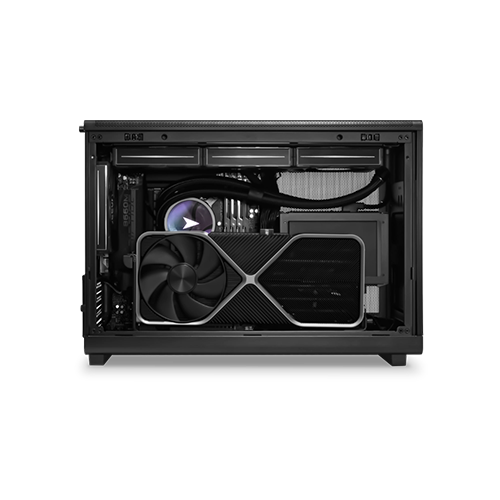
https://velocitymicro.com/img/PC/MX6/MX6_side_500.png
There is a claim, the case is this one. You will have to carefully "mine"
the Lian Li page for details about that case.
The level of detail from Lian-Li is better for allowing you to judge what you're getting. The internal location inside the box is apparently sufficient for ATX PSU,
but keep in mind that the max length of ATX supplies can be quite long,
so there is likely some limit on putting a really long ATX in there
(a 2000 watt one).
https://lian-li.com/product/a3-matx/
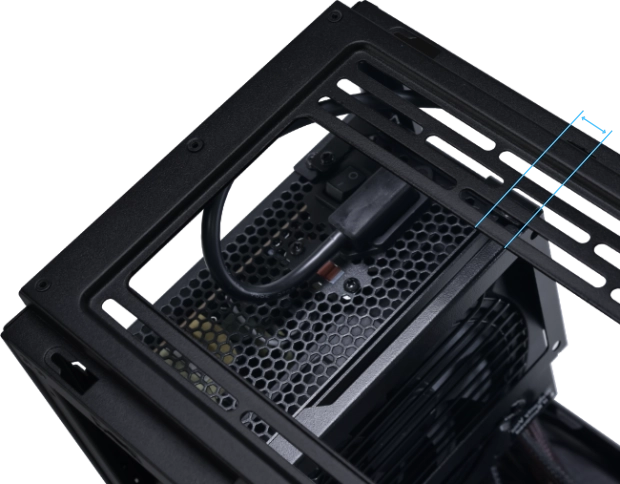
"Supports ATX/SFX/SFX-L and LIAN LI Edge PSU that can be mounted sideways or frontways"
"Flexible SFX/ ATX PSU" <=== Extension cord from PC top-rear, to the front of the case area
# Extension cord depicted here
https://lian-li.com/wp-content/uploads/2024/05/a3-h-014.webp
(from the comments section of this press release, they identified it for me)
https://www.techpowerup.com/330699/velocity-micro-unveils-mx6-mini-tower-for-enthusiasts
As long as any adapters are in the box, you're likely fine.
*******
It's a MicroATX motherboard with an embedded Wifi. The Wifi would be a module under
the aluminum cover near the I/O plate. To remove the wifi module entirely, would
require removing the motherboard from the case, as there is usually a
screw on the secondary side of the PCB for modules like that.
The Wifi antenna is a bat wing. A TPLink PCIe Wifi card, it comes with an antenna with a magnet (likely the same as this bat wing), except there are
two individually adjustable antenna sticks you can move around. I wouldn't
be particularly worried about this, but if using the Wifi on-site, you'd
better check that the Wifi is getting a good signal level. Since this is a
Lian Li case, they like to use aluminum, and then a magnetic mount would be
an interesting... exercise :-) If the customer is dead-set against Wifi,
then I recommend removing the module, but that requires taking the motherboard out of the case. It's not a good idea, to stop a Wifi by putting termination resistors on it, as the module just cranks the RF power up while attempting
to spot Wifi devices in its neighborhood. While the Wifi could be turned off
in the BIOS, the switch might not be an absolute one, and in a security-conscious
site, I would unplug the module (underneath the MSI aluminum cover near the I/O plate).
I've removed the Wifi from my Asus motherboard, during my build (Big Machine).
You're getting two single-sided DIMMs, which should give you good bandwidth for iGPU-based graphics. I don't think chippage smaller than 8GB per bank is available.
If they shipped 1x16GB, it would not be the end of the world, but it could
be slightly less good. Even a 16GB DIMM can be single sided. The only advantage of "maxxing the banks" in a PC, is keeping more pages open (for applications with poor locality of reference). And since there is a penalty on DDR5 with filling all four slots, any sort of bank optimizing is silly. For DDR5, you
use two fast DIMMs, checking they're double sided, to do the best you can
on open pages as well as memory bus clock rate.
Your M$SQL could be for inventory lookup, it could be a 32-bit edition,
so in that case, the RAM is unlikely to poop out on a POS application.
If the SQL was intended for some other unknown purpose, and there
was an intention to *buy* a more recent version, then you just might
need more RAM. But my suspicion at the moment is, 16GB is enough
for someone who doesn't plan on upgrading anything software-wise.
The fan on the back, is the key to airflow on this puppy. At a guess,
there are too many holes on the case (like my Phantek), so the air
velocity across the top surface of components would be poor. If the
PCH heatsink needed a bit more cooling for example, with a case like
that, you'd be hard pressed to crank the airflow (even if the rear
140mm was replaced with something higher than 35CFM). So when you buy
this thing, you're really relying on VelocityMicro having
checked these issues, and them signing off on it. The only reason
I'm pointing this out, is I had to tape off some of the venting of
my Phantek, just to get air to move where *I* wanted it to move.
And the box still has many fans on it. And it's all because of this
"lets put holes all over the place on the case" philosophy. Placing
the PSU in the computer case like that (venting to case air),
you want an 80+ with a good rating (a PSU from the year 2000 would
overheat that design, if subbed in).
Can't really comment on price. The only item that might be
expensive in there, is the 1TB NVMe. The case does have
room nominally, for two 2.5" drives, but then it depends on
the detail of the PSU type, as to whether the drive plate
can be used.
Paul
--- PyGate Linux v1.5.19
* Origin: Dragon's Lair, PyGate NNTP<>Fido Gate (3:633/10)