On Sun, 1/18/2026 11:40 PM, T wrote:
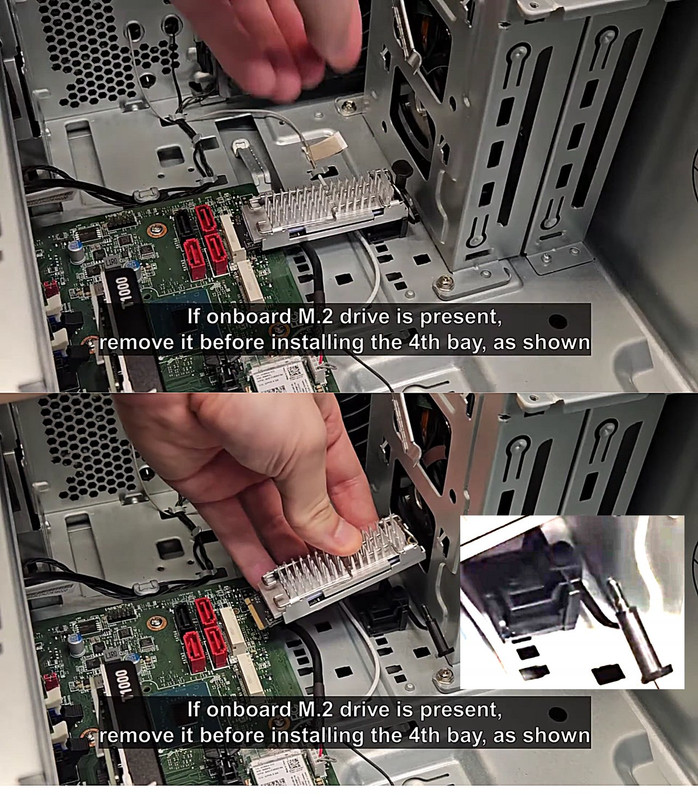
what is that tiny screw used to fasten the NVMe
drive on a lenovo ThinkStation P3 Tower Gen 2
(Intel) Workstation?
And where can I purchase about ten of them?
[Picture] Use Download Original to collect the picture
https://i.postimg.cc/4dZ0s6nf/lenovo-nvme.jpg
That particular one is not standard. And as the metal pin
has a retention band on it, the pin does not appear to
screw in either.
For conventional motherboards, they use the same angular-entry
NVMe connector, but the retention screw is:
The screw used to retain an M.2 drive is usually a "flat head M2.0 x 2.5mm"
Even at the "fastener store" here (not a Home Depot) they don't
sell #2 for example in the trays. It's a custom order and you
buy a box of 100. You would go to the computer store, and
see what the system builder uses for boxes of screws. Maybe they
have bags of ten for sale.
That means the threaded section is 0.1" long or so, and I don't have
a good tool for that. I use my magnetic screwdriver, and a regular fine tip
hex drive screwdriver bit. I could use a jewellers screwdriver but then
I wouldn't have the magnet. And most of the time, I'm trying to drive
that screw while the tool is on an angle, and the head hardly mates
properly. You have to be careful not to slip off and ding something.
The motherboards actually come with "the stud" plus the screw that
goes into the stud. The stud is already screwed to the motherboard,
like in the 110mm location. The screws come in a tiny zip-lok bag
and you only crack open the bag of screws when attempting to
install an NVMe and not before. You can see in the picture,
if you had one of these, installing that flat head screw (to hold down
the rather large shoulder surface on the module) is going to be
a pain in the ass.
https://www.amazon.ca/Standoff-Mounting-Screws-Gigabyte-Motherboards/dp/B0DG2873WB
Sometimes when working with these materials for the first time, you unscrew
the stud by accident, and make some weird conclusion about the materials.
When really, the tiny screw did not come loose when it should have. When reinstalling the stud, do not over-torque it. It just needs enough of a
twist to hold it steady. In the item there, they have included different
stud styles, to match whatever crazy motherboard you bought.
But the Youtube video I got that from,
https://www.youtube.com/watch?v=st_47WV6zMU
the two sleds have custom mechanical bits, with the intention being,
"a bit of parts sales" for Lenovo.
I could see a heatsink kit and plastic doohickey costing $30, when a
convention motherboard already includes the materials needed for all sleds.
You can move the stud from one motherboard hole to another, if for example,
you don't buy a 110mm and you buy something else.
On this Dell, there is a plastic push-pin of some sort. I wonder what the cycle-rating on that is. There are two co-linear sleds on this design,
and when you install a 110mm, it covers one of the slots so only
one NVMe can be installed.
https://goughlui.com/wp-content/uploads/2024/10/202410042236239492-1536x667.jpg
The manufacturers recognize what a shambles the thing is, which is why everyone has a different twist on a retention solution. Most will go with the standard "tiny annoying screw". Just make sure the power is off, as that screw can fall just about anywhere.
Paul
--- PyGate Linux v1.5.2
* Origin: Dragon's Lair, PyGate NNTP<>Fido Gate (3:633/10)