• Re: 2 KBs for 2 PC's, , crsss switch,

    From R.Wieser@3:633/10 to All on Sun Oct 26 20:17:23 2025
    Micky,

    The keyboards are one above each other, and I'd like a simple
    way, preferably hardware but software is okay, to switch PC's,
    so that each PC always has a keyboard, but I can make the kb in
    front work with the PC I"M using.
    ...
    I don't know what one would call this.

    I would call that a cross-switch. Something like this perhaps ?

    https://www.newegg.com/p/1DJ-00Z3-000C3

    I don't think normal KVM switches worry about the PC that's left behind,

    The old non-electronical ones (ofcourse) didn't, but the "modern" ones (even my decade old PS/2 one) all do. They would be pretty un-sellable otherwise.

    Is that why you think you need two keyboards ? In that case, you don't.

    Regards,
    Rudy Wieser


    --- PyGate Linux v1.5
    * Origin: Dragon's Lair, PyGate NNTP<>Fido Gate (3:633/10)
  • From Graham J@3:633/10 to All on Sun Oct 26 21:25:57 2025
    R.Wieser wrote:
    Micky,

    The keyboards are one above each other, and I'd like a simple
    way, preferably hardware but software is okay, to switch PC's,
    so that each PC always has a keyboard, but I can make the kb in
    front work with the PC I"M using.

    Ensure both computers are connected to your LAN.

    Install TightVNC on both computers. Configure the server component on
    the laptop, and the client component on the desktop.

    <https://www.tightvnc.com/>

    Using the keyboard+mouse on the desktop you can work with the desktop,
    or run the client and work with the laptop. While doing this, you can
    still use the keyboard and mouse on the laptop.


    --
    Graham J

    --- PyGate Linux v1.5
    * Origin: Dragon's Lair, PyGate NNTP<>Fido Gate (3:633/10)
  • From Paul@3:633/10 to All on Mon Oct 27 05:53:18 2025
    On Sun, 10/26/2025 2:34 PM, micky wrote:
    A couple years ago I tried to use digital KVM's and they almost did what
    I needed, but not quite.

    I have simplified my needs, IF they make what I want.

    I have two PCs, a desktop and laptop but the laptop uses an external
    keyboard (and mouse). And I have two keyboards, one for each (plus the built-in laptop keyboard that I don't use.)

    The keyboards are one above each other, and I'd like a simple way,
    preferably hardware but software is okay, to switch PC's, so that each
    PC always has a keyboard, but I can make the kb in front work with the
    PC I"M using.

    I don't think normal KVM switches worry about the PC that's left behind,
    and I don't know what one would call this.

    TIA


    Apparently this is a "USB Matrix Switch" and the focus of these
    seems to be mostly business and not consumer. The AI told me of a
    short list of suggestions, most DIY, the Matrix Switch was supposed
    to be a purchase-able device.

    One of the observations about USB, is the "traffic" inside the
    computer is packet based. That's how USB2 would "poll" peripherals
    8000 times per second and "check" for things to do. The back and forth
    there can involve packets. In VirtualBox, one of the extension
    techniques is to break the USB routing to the host OS and redirect
    the packet stream to a selected Guest OS. This shows us, that
    successful hardware products could be designed the same (IP) way.
    You hear the "boop" as the USB device "leaves" the Host OS,
    and a second "boop" in the Guest OS when it recognizes it has "new" hardware. That is what happens when you redirect the stream of packets.

    Earlier today, I could find some mention of "USB remoting" products
    which use a length of Ethernet cable, between a "transmitter" and
    a "receiver". This was not meant to imply that the cable could
    be cut in two and people mess about with the packets particularly.
    That is just a pt-pt solution. And it seems to violate the time
    constant of the timer for USB, which puts a limit on the length of cable.

    In any case, the Matrix Switcher concept, there is a claim that works
    in the IP packet space as well. That the core equipment works with
    intact packets transported in an IP envelope.

    But the Matrix Switch products, the first ones I could find, they are
    "8x8", and you just know this is a gouge to justify the $3000 price
    of the box.

    To DIY, this would take four RPI Zero 2W (the second version of a
    PiZero, that has Wifi onboard and a single OTG USB port for protocols).
    We would need four devices, because the RPi Zero is I/O bound, and
    the project would be even less do-able with the original version.
    There just aren't enough hardware resources to do it in style.
    I don't really want to do this with Wifi either, but that is what is
    on offer. You could use serial I/O and shared bus standards for
    an interconnect. For now, this just illustrates a concept, and this
    is not ready to build. The OS for these, has a provision for the
    USB port to be run as a Master or a Slave, so the left hand RPi runs
    one mode, the right hand RPi run the opposite mode. The user is
    responsible for plugging in the illegal cable type, on one side
    of the diagram (likely on the right).

    USB USB
    keyboard1 ----- RPI zero 2W --- Wifi Wifi --- RPi zero 2W ----- PC1
    | |
    +----------------------------------+
    | GPIO(2) |
    USB | | USB
    keyboard2 ----- RPI zero 2W --- Wifi Wifi --- RPi zero 2W ----- PC2

    That would be a Matrix Switcher for considerably less than $3000, but
    it is still relying on our home router for transport.

    The GPIO signals are for synchronizing switch-over between all four devices.
    If sync is with Wifi messages, it won't be synchronized all that well.

    *******

    A lot of the USB switchers on the consumer side, are mechanical switches. Roughly the equivalent of plugging and unplugging things. If you could find mechanical switches with sufficient contacts, it could be engineered
    for a criss-cross switching event.

    The simplest way to do clean engineering, is to use the bus reset mechanism, tell the OS the device is unplugged, tell the OS a new device is plugged
    in, and then let nature take its course. There can be significant delay from "button press" to "switched" because of this. Windows 10 would have to load
    the driver, and even with a USB serial number for comfort, it likely takes
    a few seconds to realize the driver is already in the OS folders.

    *******

    There is a danger of these solutions, violating the grounding expectations
    of PC versus USB. The PC has a hard ground. The USB peripheral uses a 2 prong wall adapter, and there is no hard ground in the peripheral side. If the two devices had hard grounds, and were on some (poorly installed) house circuits,
    a ground difference could exist. Current can then flow over the ground jacket of the USB cable.

    On farms, sometimes the milking barn, the milk pump is at a ~1V difference
    to the cows standing on damp flooring. The current flow "upsets" the cows
    and affects production.

    We have rules for ground, for comfort, for safety. The rules aren't normally put there for no reason at all.

    The Laplink USB cable you can buy, that is not a part of USB.org . And
    as far as I know, the ground is not continuous from one USB-A connector
    on the device, to the other USB-A connector. There could be a 1 megohm
    resistor in the path. If you buy a Laplink cable, you might take an ohmmeter and check whether there is a "hard path" between the metalwork on the
    two USB-A connectors. To see how they handled the issue. The protocol
    on the Laplink cable, is a first-in-first-out queue, a kind of "mailbox protocol",
    and the transfer rate achieved on the USB3 version of that cable, is
    decidedly uneven (varies with time, does not inspire confidence). When
    a transmission standard relies upon the GND reference for integrity,
    some effort has to go into making a proper (logic) GND.

    Summary: Topic is lots of fun.

    Paul

    --- PyGate Linux v1.5
    * Origin: Dragon's Lair, PyGate NNTP<>Fido Gate (3:633/10)
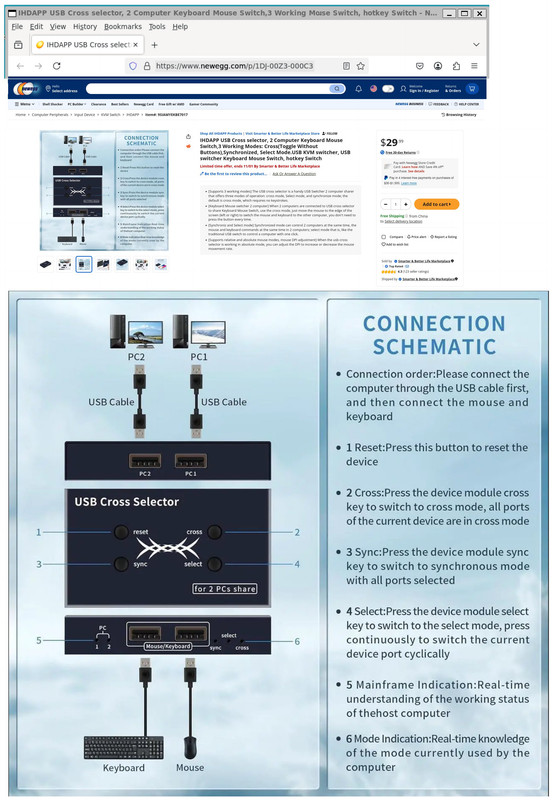
  • From Paul@3:633/10 to All on Mon Oct 27 09:33:27 2025
    On Mon, 10/27/2025 5:23 AM, Daniel70 wrote:
    On 27/10/2025 6:17 am, R.Wieser wrote:
    Micky,

    The keyboards are one above each other, and I'd like a simple
    way, preferably hardware but software is okay, to switch˙ PC's,
    so that each PC always has a keyboard, but I can make the kb in
    front work with the PC I"M using.
    ...
    ˙ I don't know what one would call this.

    I would call that a cross-switch.˙ Something like this perhaps ?

    https://www.newegg.com/p/1DJ-00Z3-000C3

    I don't think normal KVM switches worry about the PC that's left behind,

    The old non-electronical ones (ofcourse) didn't, but the "modern" ones (even >> my decade old PS/2 one) all do.˙ They would be pretty un-sellable otherwise. >>
    Is that why you think you need two keyboards ?˙ In that case, you don't.

    Regards,
    Rudy Wieser

    Rudy, clicking your link, above, brings up a newegg page saying "Sorry We can't find this item. ......"

    Maybe they sold out. ;-P

    [Picture] Select "download original" blah blah

    https://i.postimg.cc/wBSzq5HZ/USB-Cross-Selector.jpg

    Paul

    --- PyGate Linux v1.5
    * Origin: Dragon's Lair, PyGate NNTP<>Fido Gate (3:633/10)
  • From R.Wieser@3:633/10 to All on Mon Oct 27 16:06:14 2025
    Daniel70,

    Rudy, clicking your link, above, brings up a newegg page saying "Sorry We can't find this item. ......"

    Maybe they sold out. ;-P

    Thats odd, I just clicked my own link again, and got the webpage with no
    such message :

    [quote]
    Item#: 9SIAMYEKBE7017

    $29.99
    ...
    IHDAPP USB Cross selector, 2 Computer Keyboard Mouse Switch,3 Working Modes: Cross(Toggle Without Buttons),Synchronized, Select Mode.USB KVM switcher,
    USB switcher Keyboard Mouse Switch, hotkey Switch
    [/quote]

    -- What it looks like: https://c1.neweggimages.com/MPS/SellerPortal/AplusContent/9403965e624deb9548dc645eebfb3683e05392bd6e63b09be797ceca64fe49a7.jpg

    -- contains model number. https://c1.neweggimages.com/MPS/SellerPortal/AplusContent/4eea3d7c7cfd5d1ab3307c4525b0edaeed447bba3aaed1aaf1b4909afc35924a.jpg

    Than again, I've got JS disabled in my browser.

    Regards,
    Rudy Wieser


    --- PyGate Linux v1.5
    * Origin: Dragon's Lair, PyGate NNTP<>Fido Gate (3:633/10)
  • From R.Wieser@3:633/10 to All on Tue Oct 28 12:34:17 2025
    Daniel,

    ... and I just went back to your previous post and re-clicked your newegg link ..../ and failed again.

    Maybe it's a geolocation thing.

    That was my first thought too. But than I would expect a bit different "errror" message.

    Than again, I've got JS disabled in my browser.

    JS!! Don't think I've had JS enabled in 10 years or more. ....

    Same here.

    but these two links *did* work.

    No, not that way. I was thinking that perhaps some JS would be executing, replacing the websites contents.

    Than again, it /could/ be a problem beween the server looking at the
    browsers capabilities, and returning different webpages based on it.
    Hmmm... Nope, thats not it. The webpage I'm getting also contains scripts.

    A CSS overlay perhaps ? I don't see it, but that doesn't mean too much.

    Regards,
    Rudy Wieser


    --- PyGate Linux v1.5
    * Origin: Dragon's Lair, PyGate NNTP<>Fido Gate (3:633/10)
  • From micky@3:633/10 to All on Sat Nov 1 15:44:08 2025
    In alt.comp.os.windows-10, on Sun, 26 Oct 2025 20:17:23 +0100,
    "R.Wieser" <address@is.invalid> wrote:

    Micky,

    The keyboards are one above each other, and I'd like a simple
    way, preferably hardware but software is okay, to switch PC's,
    so that each PC always has a keyboard, but I can make the kb in
    front work with the PC I"M using.
    ...
    I don't know what one would call this.

    I would call that a cross-switch. Something like this perhaps ?

    https://www.newegg.com/p/1DJ-00Z3-000C3

    I found this link on the first try. I'm in the USA if t hat matters.

    I don't think normal KVM switches worry about the PC that's left behind,

    The old non-electronical ones (ofcourse) didn't, but the "modern" ones (even >my decade old PS/2 one) all do. They would be pretty un-sellable otherwise.

    You're saying a standard petty-much mechanical KVM switch should do just
    what I want???

    Is that right?

    I bought one a few years ago, but then I was trying to achieve something
    else, the more common one kb for both pcs. I will unbury it from the
    desk behind the computer and see what jacks it has, or I will look at
    new ones, assuming your answer above is yes.


    Is that why you think you need two keyboards ? In that case, you don't.

    No, it's just that I like it that way. I don't swtich back and forth a
    lot. When I'm using the secondary computer, only once in a while do I
    want to do anything on the primary, and I like using a differrent
    keyboard.

    Regards,
    Rudy Wieser


    --- PyGate Linux v1.5
    * Origin: Dragon's Lair, PyGate NNTP<>Fido Gate (3:633/10)
  • From micky@3:633/10 to All on Sat Nov 1 15:54:00 2025
    In alt.comp.os.windows-10, on Sun, 26 Oct 2025 20:17:23 +0100,
    "R.Wieser" <address@is.invalid> wrote:


    The keyboards are one above each other, and I'd like a simple
    way, preferably hardware but software is okay, to switch PC's,
    so that each PC always has a keyboard, but I can make the kb in
    front work with the PC I"M using.
    ...
    I don't know what one would call this.

    I couldn't figure out what to call it either. If it had a name, I
    could search for it :-(

    I would call that a cross-switch. Something like this perhaps ?

    https://www.newegg.com/p/1DJ-00Z3-000C3

    It sounds right, "3 Working Modes: Cross(Toggle Without
    Buttons),Synchronized, Select Mode." although I'm just guesing what
    those 3 modes are, but then 2 of the pictures show just one keyboard but
    two monitors.

    --- PyGate Linux v1.5
    * Origin: Dragon's Lair, PyGate NNTP<>Fido Gate (3:633/10)
  • From R.Wieser@3:633/10 to All on Sat Nov 1 21:27:58 2025
    micky,

    You're saying a standard petty-much mechanical KVM switch
    should do just what I want???

    Is that right?

    If it was only that simple ...

    The problem with mechanical switches is *when* you switch them. If there is any kind of communication between the keyboards and 'puters than it will get interrupted, which will likely cause problems.

    And than there is the problem of /when/ the different connections are broken and others made. They need to be break-before-make. If at any time any of the individual switches changes to make-before-breake than you have a
    problem, and could destroy, the nowerdays rather touchy, equipment (both keyboards and/or 'puter).


    The current electronical switches will hold-off the actual switching until
    its safe to do so. And they will most likely also remember the caps-, num- and scroll-lock statusses for each 'puter, and re-apply them to the
    keyboards when you switch.

    iow, do *not* try to use a mechanical switch. tbh, I don't think they exist for current USB keyboards.

    assuming your answer above is yes.

    Alas, the answer is No.

    I will unbury it from the desk behind the computer and
    see what jacks it has

    Probably fror the (very) old 5-pin DIN plugs. https://upload.wikimedia.org/wikipedia/commons/thumb/c/cf/Cherry-Schneider-MF2-5-Pin-DIN-Connector.jpg/250px-Cherry-Schneider-MF2-5-Pin-DIN-Connector.jpg

    Is that why you think you need two keyboards ? In that
    case, you don't.

    No, it's just that I like it that way.

    Ok, I just wanted to make sure.

    Regards,
    Rudy Wieser


    --- PyGate Linux v1.5
    * Origin: Dragon's Lair, PyGate NNTP<>Fido Gate (3:633/10)
  • From micky@3:633/10 to All on Sat Nov 1 17:16:27 2025
    I guess I will try again with a software idea. I don't know why I had
    so much trouble when other people seem happy with any of several
    methods.

    Thanks for your answers and thanks to everyone for theirs.


    In alt.comp.os.windows-10, on Sat, 1 Nov 2025 21:27:58 +0100, "R.Wieser" <address@is.invalid> wrote:

    micky,

    You're saying a standard petty-much mechanical KVM switch
    should do just what I want???

    Is that right?

    If it was only that simple ...

    The problem with mechanical switches is *when* you switch them. If there is >any kind of communication between the keyboards and 'puters than it will get >interrupted, which will likely cause problems.

    And than there is the problem of /when/ the different connections are broken >and others made. They need to be break-before-make. If at any time any of >the individual switches changes to make-before-breake than you have a >problem, and could destroy, the nowerdays rather touchy, equipment (both >keyboards and/or 'puter).


    The current electronical switches will hold-off the actual switching until >its safe to do so. And they will most likely also remember the caps-, num- >and scroll-lock statusses for each 'puter, and re-apply them to the >keyboards when you switch.

    iow, do *not* try to use a mechanical switch. tbh, I don't think they exist >for current USB keyboards.

    assuming your answer above is yes.

    Alas, the answer is No.

    I will unbury it from the desk behind the computer and
    see what jacks it has

    Probably fror the (very) old 5-pin DIN plugs. >https://upload.wikimedia.org/wikipedia/commons/thumb/c/cf/Cherry-Schneider-MF2-5-Pin-DIN-Connector.jpg/250px-Cherry-Schneider-MF2-5-Pin-DIN-Connector.jpg

    Is that why you think you need two keyboards ? In that
    case, you don't.

    No, it's just that I like it that way.

    Ok, I just wanted to make sure.

    Regards,
    Rudy Wieser


    --- PyGate Linux v1.5
    * Origin: Dragon's Lair, PyGate NNTP<>Fido Gate (3:633/10)